What is BOMLLM + four-machine architecture
What is BOMLLM · four-machine architecture
TL;DR — the 30-second summarytldr
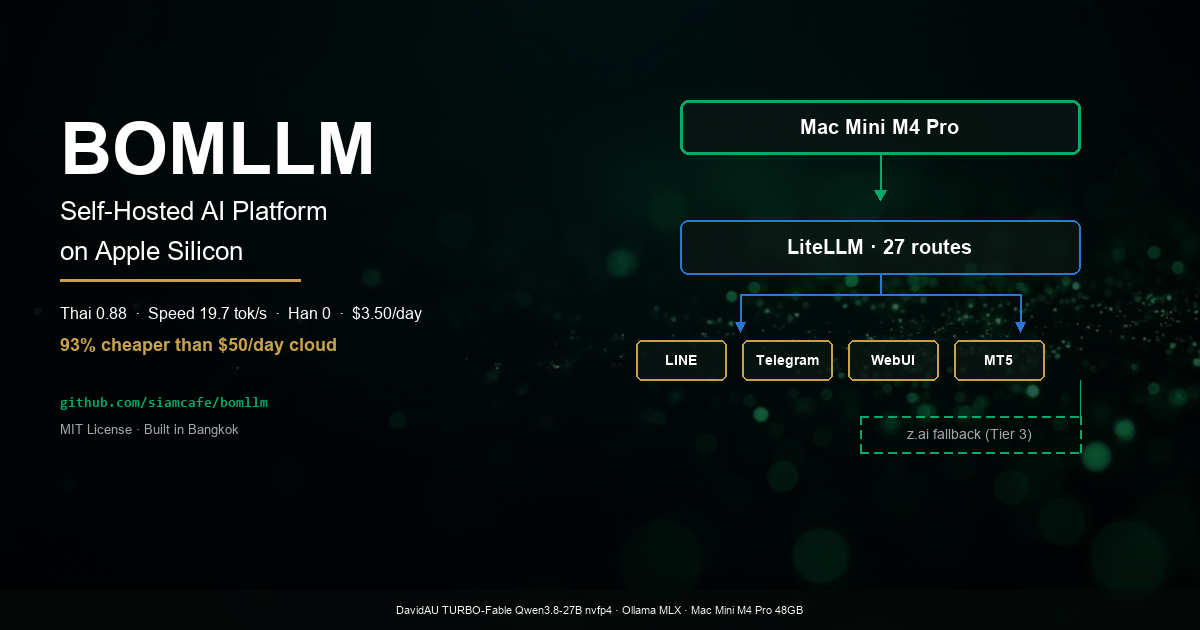
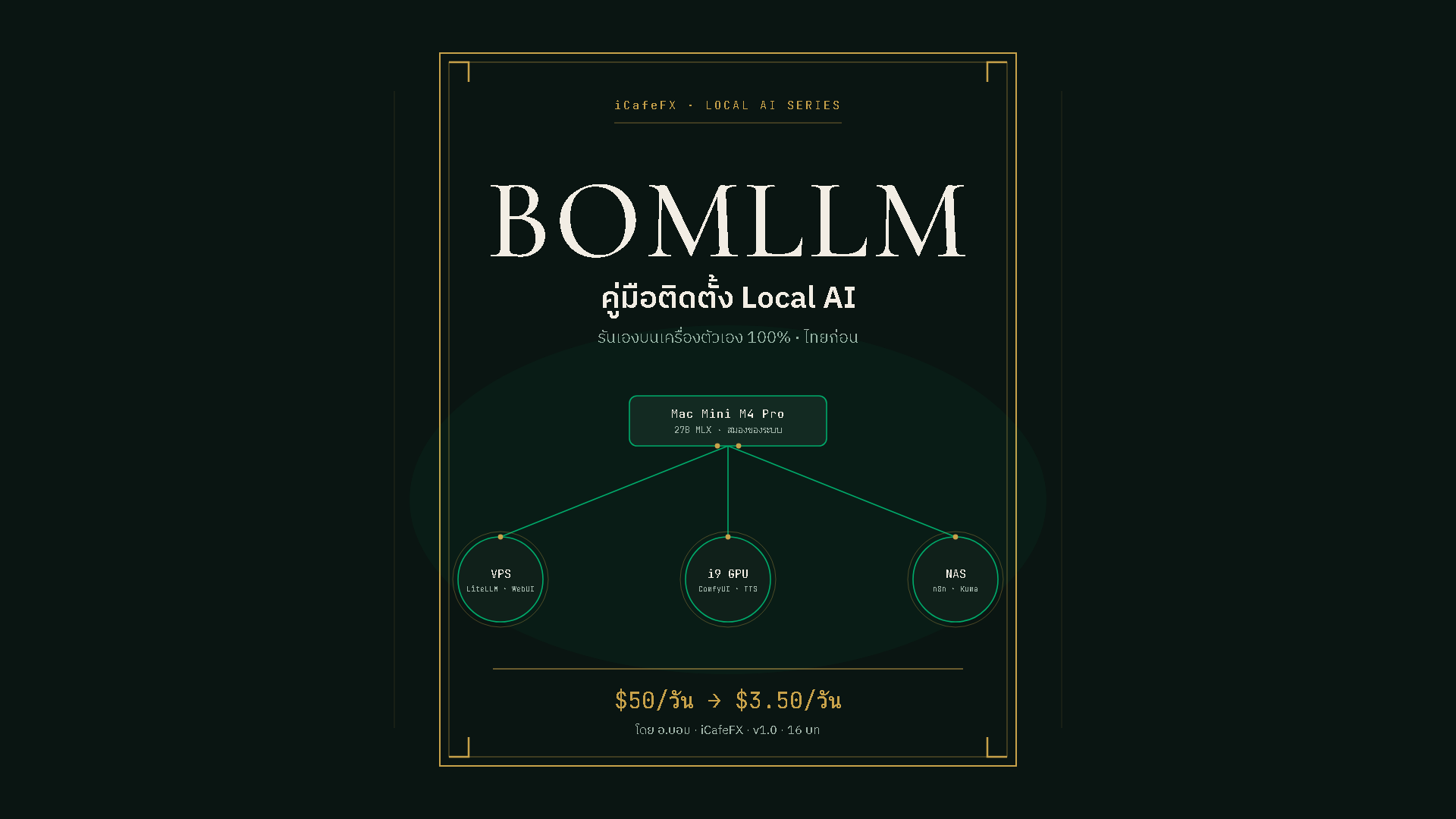
BOMLLM is an AI system that runs 100% on your own machines — stop paying cloud LLM bills of ~$50/day (≈ 1,700 baht) and switch to a single Mac Mini on the desk, with whole-fleet electricity measured for real at ~$0.54/day (≈ 18 baht) and even the worst case (cloud fallback active) stays under ~$3.50/day (≈ 120 baht)
| Item | Before (cloud) | After (BOMLLM) |
|---|---|---|
| Daily LLM cost | ~$50.00 (≈ 1,700 baht) | $0.31–2.76 (fallback only) |
| Whole-fleet electricity | — | ~$0.54 (≈ 18 baht) measured from a real meter |
| rate limit | Yes | None |
| Data | sits on someone else's cloud | main processing on machines the owner controls |
| Total per month | ~$1,500 (≈ 51,000 baht) | ~$36–114 (≈ 1,200–3,900 baht) |
This system has been running in production continuously since August 2026 serving 5 channels at once — LINE bot, Telegram bot, an analysis desk on MT5 (read-only), a web chat, and an automated article-writing pipeline — answering Thai first, and in a real 50-case test it beat the cloud models we used to pay for (score 7.24 vs 6.02) while answering ~7x faster
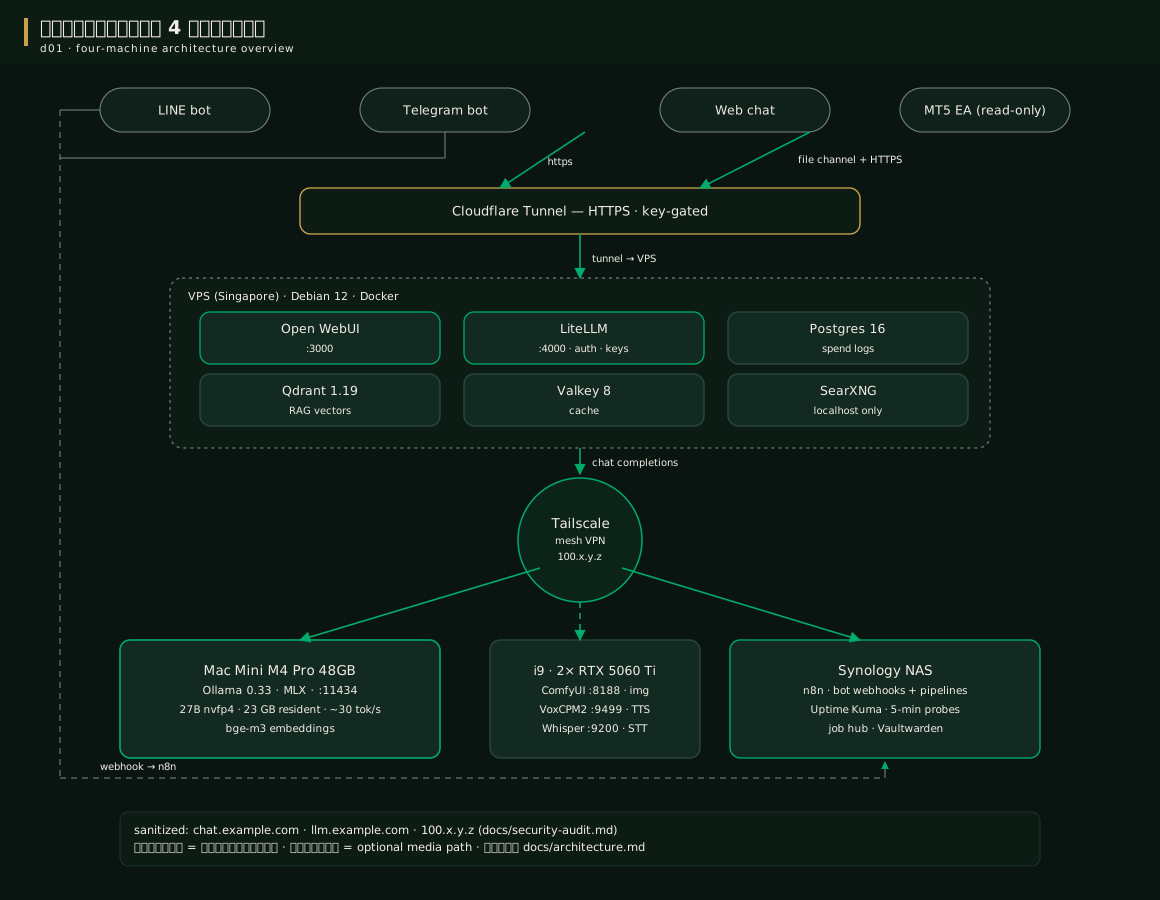
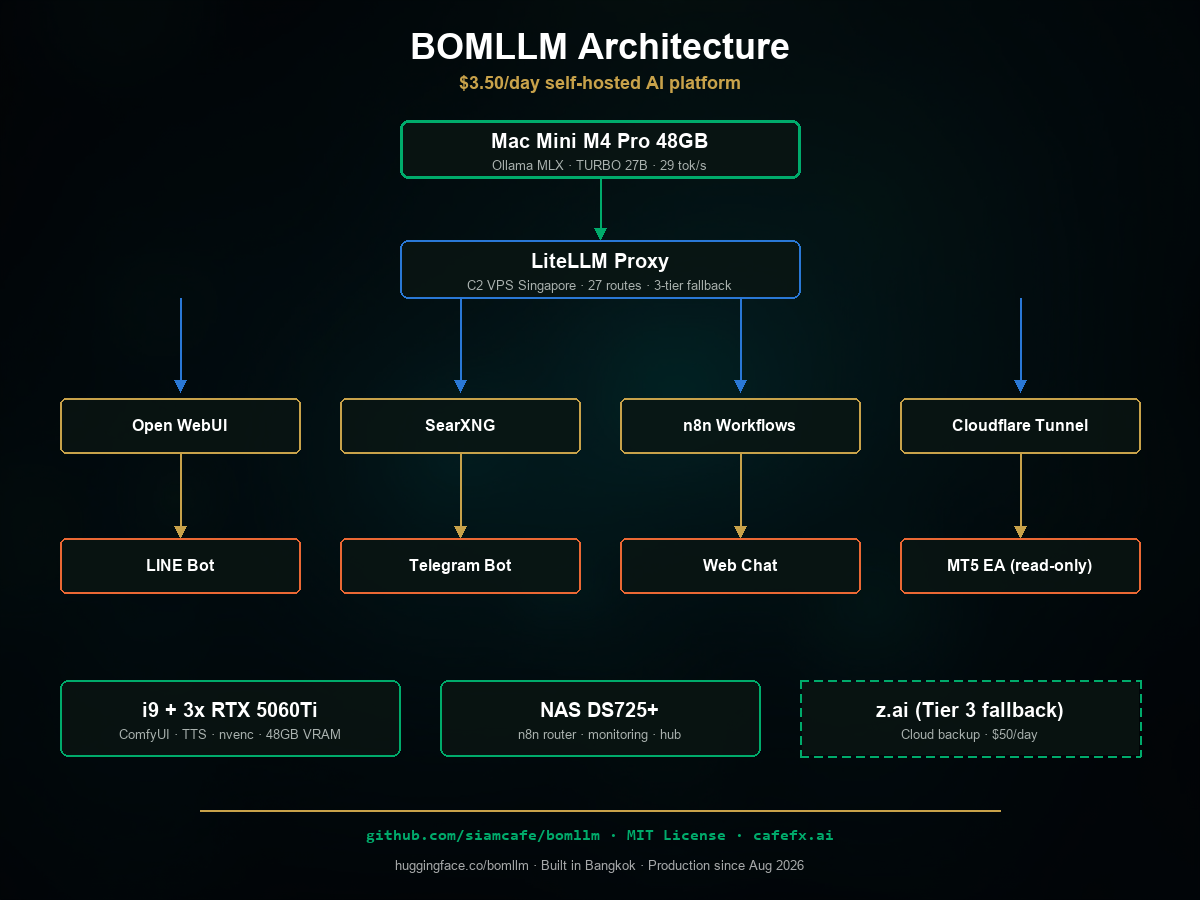
BOMLLM consists of 4 machines with a clear division of duties — picture a restaurant: Mac Mini = the brain (the star chef), VPS = the storefront (dining room + cashier), NAS = the back-office manager (schedules shifts + keeps watch), i9 = the image-and-audio kitchen (a separate stove for special dishes)
| Machine | Role | Why this machine |
|---|---|---|
| Mac Mini M4 Pro 48GB | The brain — LLM processing | the best value in speed per watt per baht — for a 27B-class model: 30 tok/s on MLX vs 7.9 tok/s on GGUF on the same machine; quiet, drawing 30–65 W |
| VPS (Singapore) | The storefront — public HTTPS | takes HTTPS, authentication, budgets, the RAG database, web search — cheap, always online, close to users |
| i9 + 2× RTX 5060 Ti | The kitchen — image and audio work | Running ComfyUI image generation and Thai TTS requires CUDA — a machine we already owned, so the only added cost is electricity |
| NAS Synology DS725+ | The back-office manager — automation | Runs n8n, receives webhooks, watches with Uptime Kuma, backs up data — low power draw, already on 24/7 |
Every machine is connected through Tailscale (a private mesh VPN), and the single door to the outside world goes through Cloudflare Tunnel — no router port is opened at all, not even one; every API requires a key (see chapters 2 and 9)
When to usewhen to use
BOMLLM is right for you if…
- your business or workload burns tens of thousands of baht a month on cloud LLMs — the more calls you make, the more you save
- you want customer data, chats and code to never leave the house (bank-grade privacy)
- you hit rate limits when work spikes and want thousands of uncapped calls a day
- most of your work is Thai Q&A, gold/forex analysis, content writing, translation, classification — which covers ~85% of real traffic
Not right for you if…
- you need a frontier model for brand-new, very hard coding work — for that job, Tier 3 cloud is still cheaper
- you have no time at all to maintain a system — you are your own SRE, budget ~1–2 hrs/week (upgrades, watching logs)
- you think one click and it is done — this 9-chapter manual is "proof that real work is required", not magic
This 4-machine architecture is something that grew out of real use, not a fancy-website-style design drawn up in advance — if you are starting fresh:
- Bare minimum: a single Mac + Cloudflare Tunnel already runs (chat + bot) — this kit boots without the i9 and the NAS; channels with no machine behind them simply stay off
- Have image/audio work: add the i9 (or any NVIDIA machine you already own) per chapter 6
- Have bots + scheduled jobs: add the NAS (or any always-on Linux machine you already own) for n8n
- More speed / less risk: these are extras — the core system still lives on a single Mac
How-tohow to
No hands-on work in this chapter yet — its job is to let you see the real numbers before deciding. The path through the whole manual is
- Know the system — chapters 1–2 (cost numbers, architecture, the hardware you need)
- Install — chapters 2–4 (the Tailscale network → Mac → VPS → config files → per-channel keys)
- Use it — chapters 5–6 (the Open WebUI web chat, extra models, images/audio, Thai formulas)
- Connect channels — chapters 7–8 (LINE/Telegram, MT5 + the article pipeline)
- Maintain it — chapter 9 (security, upgrades and troubleshooting)
Finish PART 1 before opening your wallet — chapter 2 says clearly what is required and what is optional; if you get stuck anywhere → chapter 9
The path of a single message (normal chat):
Browser -> Cloudflare Tunnel -> Open WebUI -> LiteLLM (checks key+budget+picks route)
          -> Tailscale -> Ollama MLX (Mac) -> streams the answer back the same way
The web chat never talks to the Mac directly — every call goes through LiteLLM so it can be verified and logged 100%
The path of a bot message (LINE/Telegram):
LINE/Telegram platform -> webhook -> n8n (NAS) -> workflow
  -> LiteLLM /v1/chat/completions (model thai-chat-rt, think off)
  -> format the answer -> reply to the platform
Special routes: web search uses SearXNG on the VPS, RAG uses vectors on Qdrant, images run to ComfyUI through the router on the NAS, audio runs to the i9 — details in chapters 5–6; if you get stuck anywhere → chapter 9
Config exampleconfig example
Here is the condensed "expense receipt" — every number was measured from real hardware, not guessed (the full version with the measurement method lives in docs/cost.md in the repo)
# Daily electricity cost = Σ(machine average watts x 24 hrs / 1000) x price per unit
# Real data from plug meters + powermetrics / nvidia-smi (7-day average)

Mac Mini M4 Pro 48GB    ~8 W  (estimated)      -> 0.192 kWh/day (approx.)
i9 + 2x RTX 5060 Ti    ~93 W  (GPU, measured)     -> 2.232 kWh/day (approx.)
NAS Synology DS725+    ~28 W  (survey midpoint) -> 0.67 kWh/day
Network gear (share)   ~15 W                   -> 0.36 kWh/day
------------------------------------------------------------------
Total 3.67 kWh x 4.84 baht/kWh (MEA) = ~17.8 baht/day ~ $0.54
The electricity you actually pay varies with your local utility's rate — the kWh figures are the reusable numbers
The remaining cloud spend (Tier 3 fallback, only on days when the Mac is down) is measured from the LiteLLM_SpendLogs table in the first week of September 2026: normal days $0.31–1.10, worst peak day $2.76 (55% of the $5 cap) — the cap was never breached
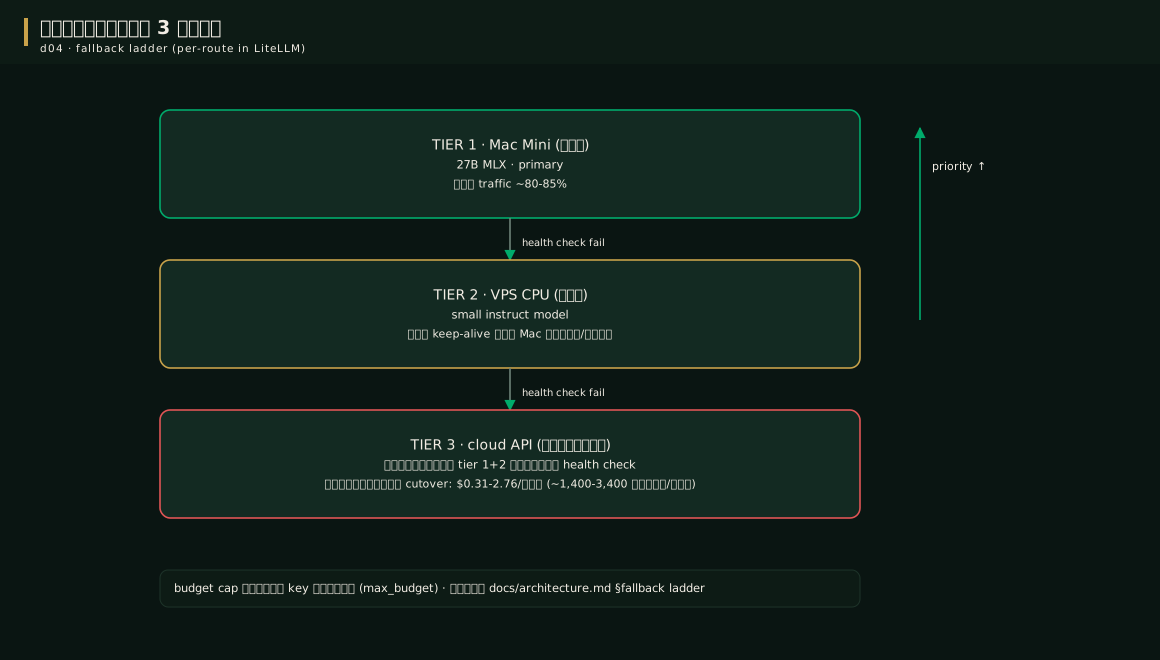
The 3-tier fallback ladder — the reason the system never goes dark, even when the Mac reboots:
| Tier | Where | Cost | Duty |
|---|---|---|---|
| 🟢 Tier 1 | Mac (27B MLX) | Free | takes ~80–85% of all traffic |
| 🟡 Tier 2 | VPS (small model on CPU) | Free | holds the bots up while the Mac boots or runs too hot |
| 🔴 Tier 3 | Cloud API | Costs money | pulled in only when the first two tiers truly fail — real spend $0.31–2.76/day |
This whole mechanism is configured in LiteLLM (the fallbacks rows) — the actual setup is in chapter 4
Pro tip — lessons from the fieldpro tip
FAQfaq
Q: Is the Thai really good enough? — good enough to genuinely replace the cloud: its 50-case evaluation score wins with statistical significance (see chapter 6), though it still has limitations we do not hide — for example, Chinese characters slip into ~15/100 answers
Q: How good with computers do I need to be? — comfortable enough with a terminal, SSH and Docker; this manual walks chapter by chapter, and every command can be copied
All 12 most-asked questions (cost, risk, trading and more) are collected on the FAQ page
Q: Why not put everything on one machine? — you can, but splitting the machines means (1) heavy image/audio work never touches LLM speed, (2) the public storefront is separated from the brain, (3) machines we already owned become useful again
Q: How powerful does the VPS need to be? — the reference spec is Debian 12, 12 vCPU, 47GB, but the compose stack runs comfortably on 4 vCPU / 8GB
See alsosee also
- Chapter 2 · Hardware and network — what to buy first, and how to connect the 4 machines
- Chapter 3 · Mac Mini and VPS — installing the brain and the front of house
- Chapter 6 · The Thai recipe — the heart of answer quality
- Chapter 9 · Security — why this structure is safer than opening ports
- GitHub — source code + the full receipt
Figuresfigures
Real screen recording for this lesson · click play to hear the summary · not investment advice
▶ Watch the manual video: https://youtu.be/O4hM39cgDCY