Four-machine architecture
Four-machine architecture
TL;DR — the 30-second summarytldr
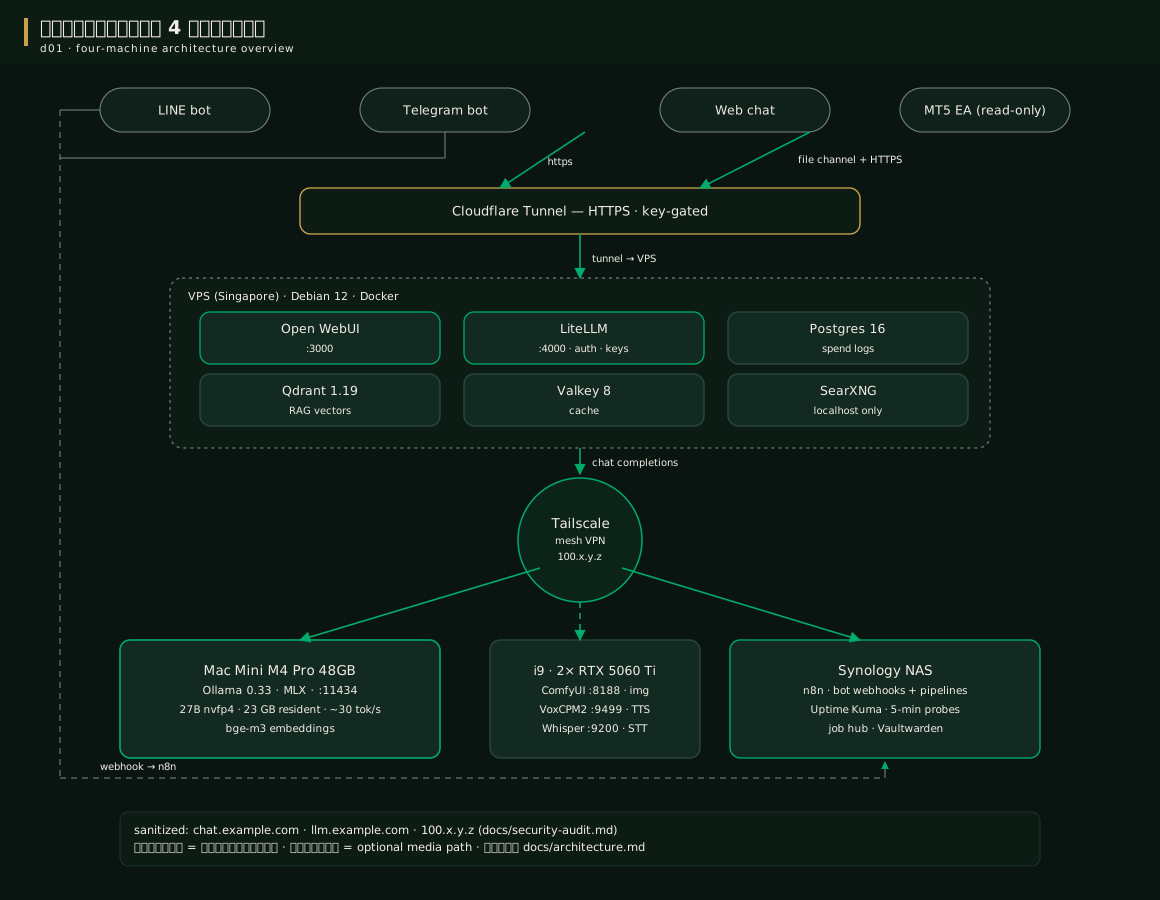
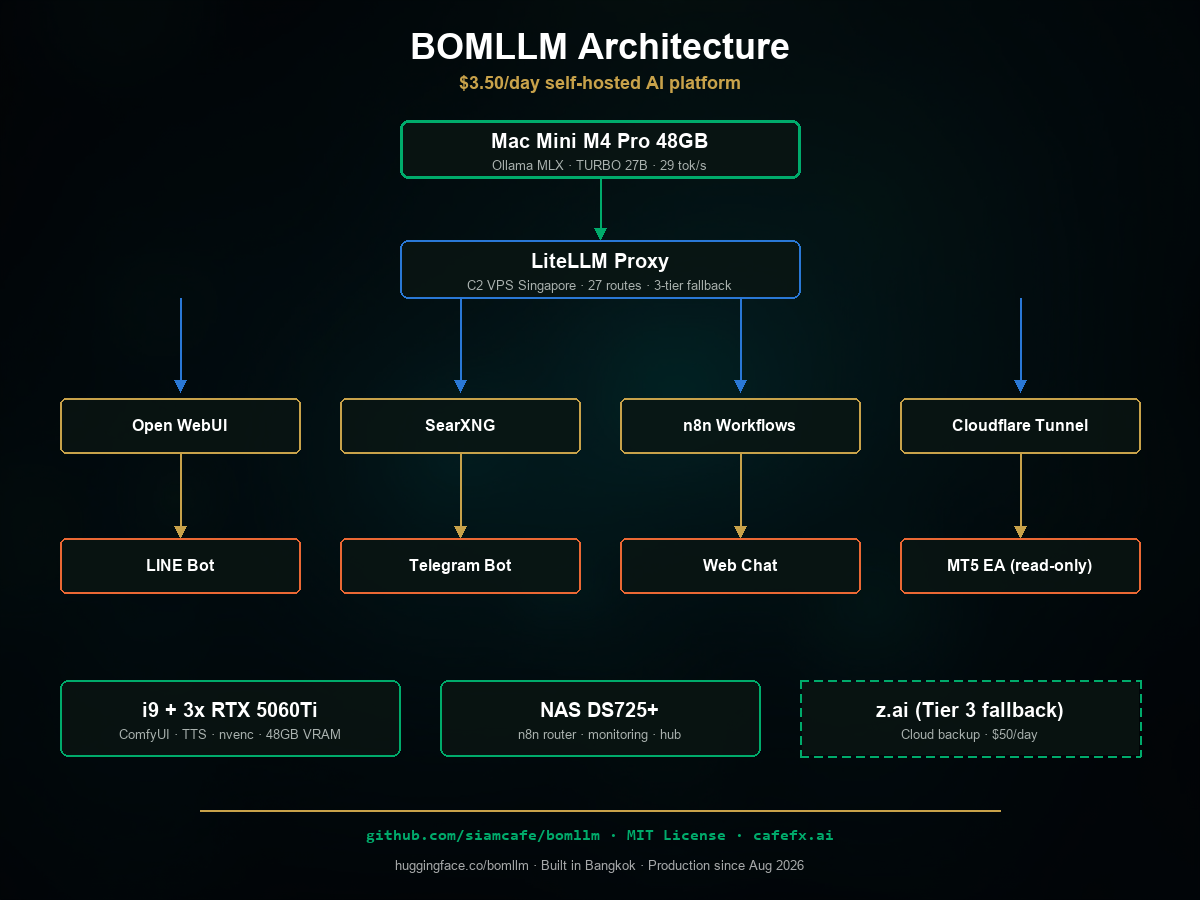
BOMLLM consists of 4 machines with a clear division of duties — picture a restaurant: Mac Mini = the brain (the star chef), VPS = the storefront (dining room + cashier), NAS = the back-office manager (schedules shifts + keeps watch), i9 = the image-and-audio kitchen (a separate stove for special dishes)
| Machine | Role | Why this machine |
|---|---|---|
| Mac Mini M4 Pro 48GB | The brain — LLM processing | the best value in speed per watt per baht — for a 27B-class model: 30 tok/s on MLX vs 7.9 tok/s on GGUF on the same machine; quiet, drawing 30–65 W |
| VPS (Singapore) | The storefront — public HTTPS | takes HTTPS, authentication, budgets, the RAG database, web search — cheap, always online, close to users |
| i9 + 2× RTX 5060 Ti | The kitchen — image and audio work | Running ComfyUI image generation and Thai TTS requires CUDA — a machine we already owned, so the only added cost is electricity |
| NAS Synology DS725+ | The back-office manager — automation | Runs n8n, receives webhooks, watches with Uptime Kuma, backs up data — low power draw, already on 24/7 |
Every machine is connected through Tailscale (a private mesh VPN), and the single door to the outside world goes through Cloudflare Tunnel — no router port is opened at all, not even one; every API requires a key (see chapters 4 and 15)
When to usewhen to use
This 4-machine architecture is something that grew out of real use, not a fancy-website-style design drawn up in advance — if you are starting fresh:
- Bare minimum: a single Mac + Cloudflare Tunnel already runs (chat + bot) — this kit boots without the i9 and the NAS; channels with no machine behind them simply stay off
- Have image/audio work: add the i9 (or any NVIDIA machine you already own) per chapter 11
- Have bots + scheduled jobs: add the NAS (or any always-on Linux machine you already own) for n8n
- More speed / less risk: these are extras — the core system still lives on a single Mac
How-tohow to
The path of a single message (normal chat):
Browser -> Cloudflare Tunnel -> Open WebUI -> LiteLLM (checks key+budget+picks route)
          -> Tailscale -> Ollama MLX (Mac) -> streams the answer back the same way
The web chat never talks to the Mac directly — every call goes through LiteLLM so it can be verified and logged 100%
The path of a bot message (LINE/Telegram):
LINE/Telegram platform -> webhook -> n8n (NAS) -> workflow
  -> LiteLLM /v1/chat/completions (model thai-chat-rt, think off)
  -> format the answer -> reply to the platform
Special routes: web search uses SearXNG on the VPS, RAG uses vectors on Qdrant, images run to ComfyUI through the router on the NAS, audio runs to the i9 — details in chapters 10–11; if you get stuck anywhere → chapter 16
Config exampleconfig example
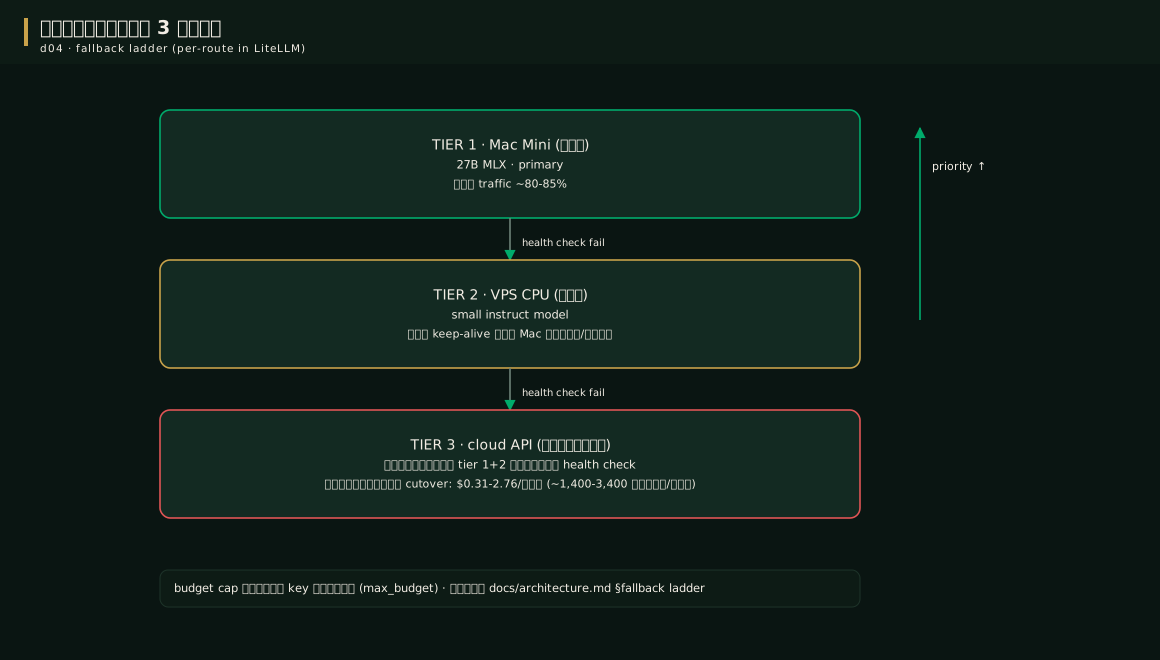
The 3-tier fallback ladder — the reason the system never goes dark, even when the Mac reboots:
| Tier | Where | Cost | Duty |
|---|---|---|---|
| 🟢 Tier 1 | Mac (27B MLX) | Free | takes ~80–85% of all traffic |
| 🟡 Tier 2 | VPS (small model on CPU) | Free | holds the bots up while the Mac boots or runs too hot |
| 🔴 Tier 3 | Cloud API | Costs money | pulled in only when the first two tiers truly fail — real spend $0.31–2.76/day |
This whole mechanism is configured in LiteLLM (the fallbacks rows) — the actual setup is in chapter 7
Pro tip — lessons from the fieldpro tip
FAQfaq
Q: Why not put everything on one machine? — you can, but splitting the machines means (1) heavy image/audio work never touches LLM speed, (2) the public storefront is separated from the brain, (3) machines we already owned become useful again
Q: How powerful does the VPS need to be? — the reference spec is Debian 12, 12 vCPU, 47GB, but the compose stack runs comfortably on 4 vCPU / 8GB
For other questions see the FAQ
See alsosee also
- Chapter 4 · Prepare the network — how to connect the 4 machines so they can talk
- Chapter 6 · The VPS = storefront — installing the storefront tier
- Chapter 15 · Security — why this structure is safer than opening ports
Figuresfigures
Videovideo
Real screen recording for this lesson · click play to hear the summary · not investment advice
▶ Watch the manual video: https://youtu.be/O4hM39cgDCY