VPS = the front of house
VPS: bootstrap the front of house
TL;DR — a 30-second summarytldr
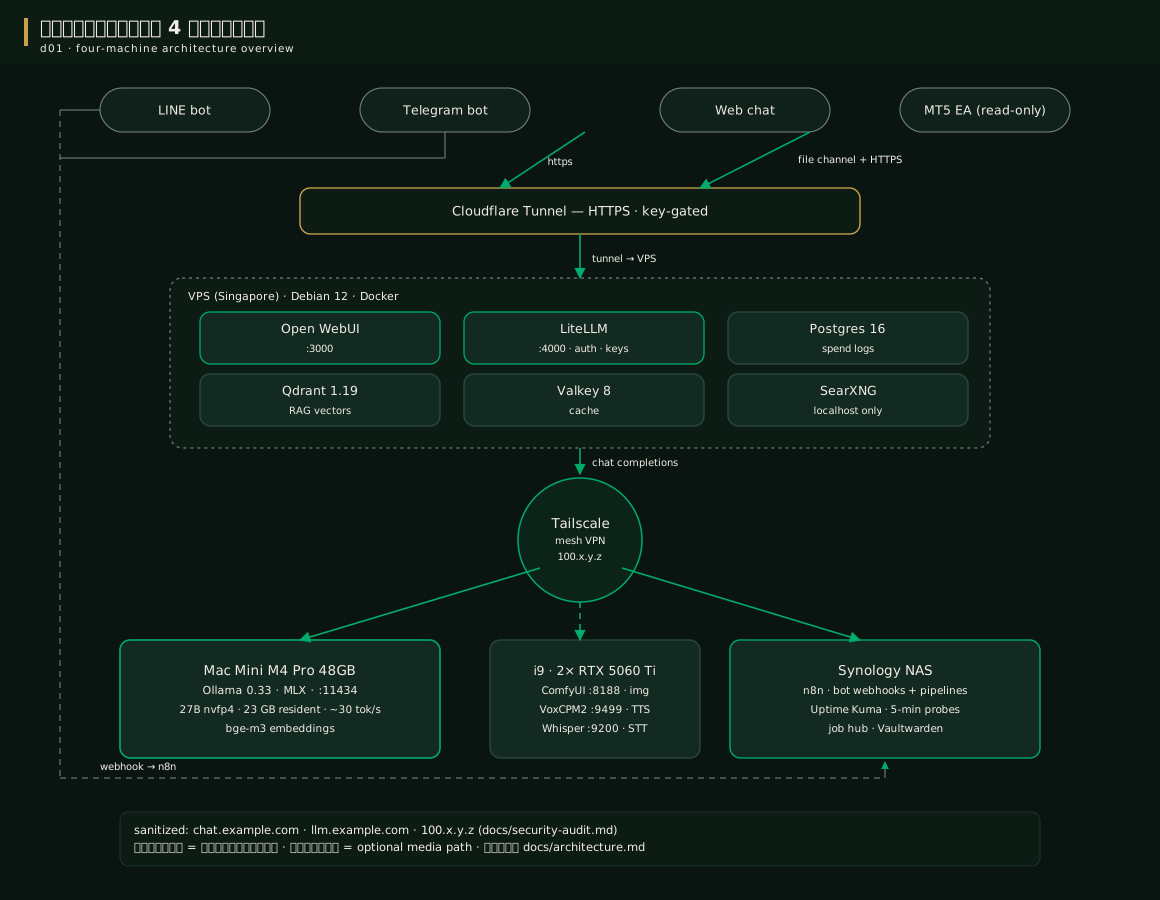
The VPS is the "front of house" — the point the outside world sees. It has 3 jobs: take HTTPS, check keys and budgets, and host the database/web search — all of it runs as Docker containers, six of them, raised by a single command
| Service | Job | Why it exists |
|---|---|---|
| LiteLLM | The API gate — keys/budgets/routes/fallback | The heart that controls every call and records the cost every time |
| Open WebUI | Web chat for users | The storefront real users see |
| Postgres 16 | Main database | Stores spend logs + user data |
| Qdrant 1.19 | Vectors for RAG | The internal knowledge store — localhost only |
| Valkey 8 | Cache | Cuts repeated work |
| SearXNG | Our own web-search tool | Replaces paid search APIs — localhost only |
When to usewhen to use
Do this chapter once the network (chapter 4) is ready — a minimal VPS of 4 vCPU / 8GB / Debian 12 or Ubuntu is enough (ours is 12 vCPU / 47GB because it is shared with other work)
- You need Docker + the compose plugin (install per docs.docker.com for Linux)
- You need Tailscale already on the VPS (note the Mac's Tailscale IP from chapter 4 to put into .env in the next chapter)
- You need a domain with DNS already registered on Cloudflare (for the tunnel from chapter 4)
How-tohow to
The good part of this kit is the bootstrap.sh script — it checks everything first, then raises the whole stack with one command, safe to re-run:
# Clone the repo and prepare the secrets file
git clone https://github.com/siamcafe/bomllm.git
cd bomllm
cp configs/.env.example .env      # then open it and replace every CHANGE_ME value (chapter 7)

# Raise the whole stack (idempotent — safe to re-run)
./scripts/bootstrap.sh

# Or preview what it will do, without touching anything real
./scripts/bootstrap.sh --dry-run
The script will: verify .env is chmod 600, refuse any leftover CHANGE_ME values, generate litellm.yaml from the example, seed SearXNG, pull version-pinned images, run up -d, wait for LiteLLM to be alive, then run the smoke gate
What you must do yourself after bootstrap (the script prints it at the end):
- Point the Cloudflare Tunnel: chat your-domain → localhost:3000 and llm your-domain → localhost:4000 (never open public ports directly)
- Create the models on the Mac per chapter 5 (if not done yet)
- Issue the per-channel keys — chapter 8
- Run the full 6-check suite — chapter 16
Real output from the machine after a successful raise:
Source: the components page of this manual (generated from the sanitized repo docs)
If anything gets stuck → chapter 16
Config exampleconfig example
The heart of the front of house is docker-compose.yml — its most important parts with explanations:
services:
  litellm:
    image: ghcr.io/berriai/litellm:main-stable   # pinned tag, never latest
    environment:
      # every secret comes from .env — no real values in this file
      LITELLM_MASTER_KEY: ${LITELLM_MASTER_KEY:?set in .env}
      # the Mac via Tailscale only — never a public IP
      MAC_OLLAMA_BASE_URL: ${MAC_OLLAMA_BASE_URL:?e.g. http://100.x.y.z:11434}
    volumes:
      - ./configs/litellm.yaml:/app/config.yaml:ro   # the real config, mounted read-only
    ports:
      - "127.0.0.1:4000:4000"   # the front of house is gated by the tunnel, never publish

  open-webui:
    image: ghcr.io/open-webui/open-webui:v0.11.3
    environment:
      OPENAI_API_BASE_URLS: "http://litellm:4000/v1"  # goes through the proxy only
      OLLAMA_BASE_URLS: ""      # empty on purpose: the WebUI must not bypass the proxy straight to the Mac
      ENABLE_WEB_SEARCH: "true" # web search uses the local SearXNG (saves API fees)
      RAG_EMBEDDING_ENGINE: ollama
      RAG_EMBEDDING_MODEL: bge-m3
The full version with every service lives in the repo — this file is designed to be copied and used as-is, with no secrets embedded
Pro tip — field-tested trickspro tip
FAQfaq
Q: Can I run it on a VPS in Thailand? — Yes, but Singapore is recommended: closer to Thai users, low latency, similar price. The Mac at home talks to the VPS over Tailscale no matter where it sits
Q: Is the VPS a hidden cost not counted in the $0.54? — Yes. The ~$10–15/month VPS is counted separately because ours hosts other work too; if you rent a new one purely for BOMLLM, add ~$0.4 to the daily cost
For other questions see the FAQ
See alsosee also
- Chapter 7 · .env and litellm.yaml — fill in the real values line by line
- Chapter 8 · Virtual keys — issue keys per channel
- Chapter 16 · Upgrades — how to upgrade each container safely
Figuresfigures
Videovideo
Real screen recording of this lesson · click play to hear the summary · not investment advice
▶ Watch the manual video: https://youtu.be/O4hM39cgDCY