Images, voice and the Thai recipe
Image and voice on the i9 · the Thai recipe
TL;DR — the 30-second summarytldr
This chapter is an "optional" extra — if you want AI that can draw images and speak Thai as well as a full cloud service, we combine several ComfyUI instances into a single "kitchen" + the VoxCPM2 Thai speech synthesizer and the Whisper transcriber on the i9
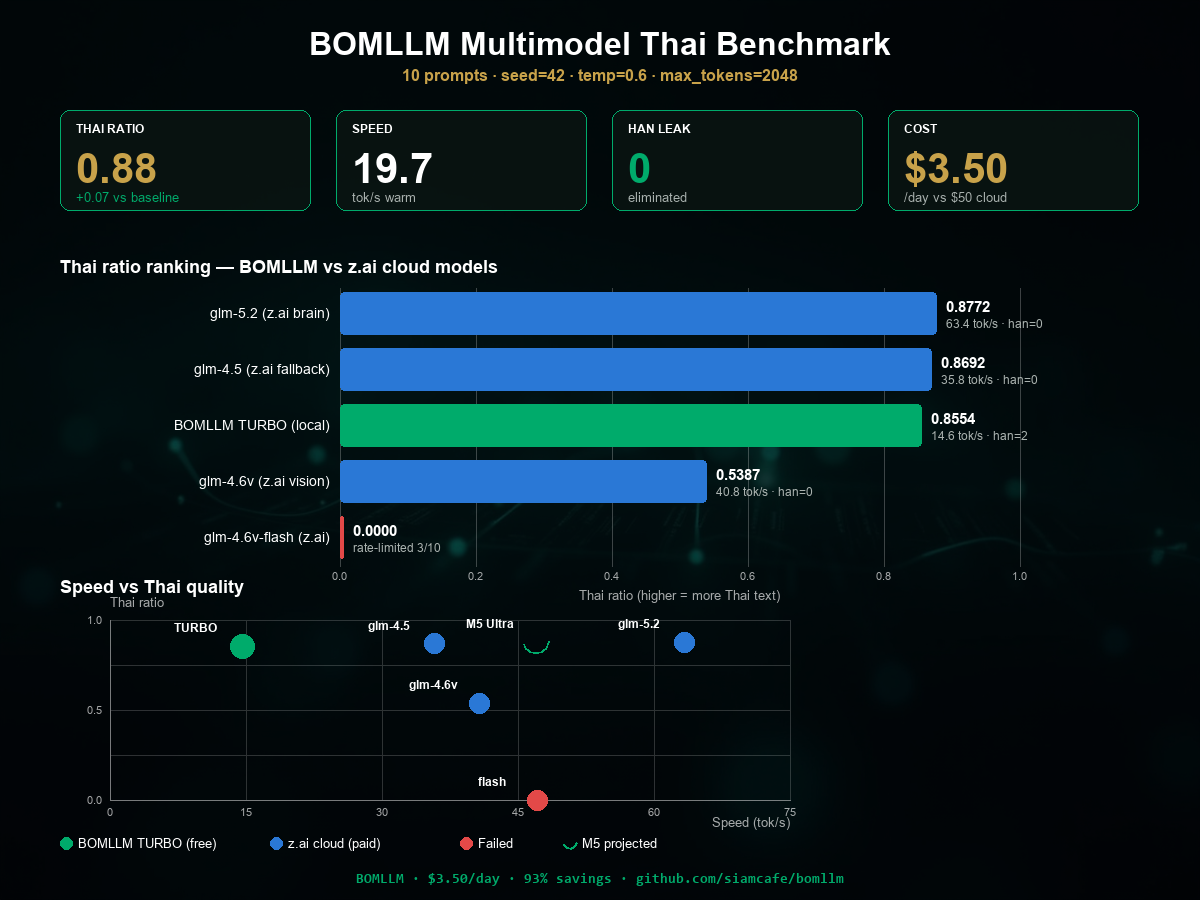
This chapter is the "crown" of the whole manual — how to make the model answer in Thai well enough to truly replace the cloud you used to pay for; every value you see here passed a criteria-based test (50 real cases, scored by two judge models), not gut feeling
| Metric | BOMLLM (Mac 27B MLX) | Previous cloud (GLM-4.5-Flash) | Result |
|---|---|---|---|
| Overall score (1–10) | 7.24 | 6.02 | wins by 1.20× ✅ |
| LINE Q&A quality | 8.93 | 6.33 | wins by 1.41× ✅ |
| Answer speed (median) | 5.2 s | 35.1 s | ~7× faster ✅ |
| Error rate (30 s) | 4% (2/50) | 0% | accepted honestly ⚠️ |
| Thai purity (thai_ratio) | 0.797 (0.832 strict) | 0.762 | higher ✅ |
| Stray Chinese characters (per 100 answers) | 15 | 43 | less than half ✅ |
When to usewhen to use
Do this when you have a spare NVIDIA GPU machine (we use an i9 + 2× RTX 5060 Ti + one more AMD box) — if you do not have one, you can skip this chapter; the core system is unaffected
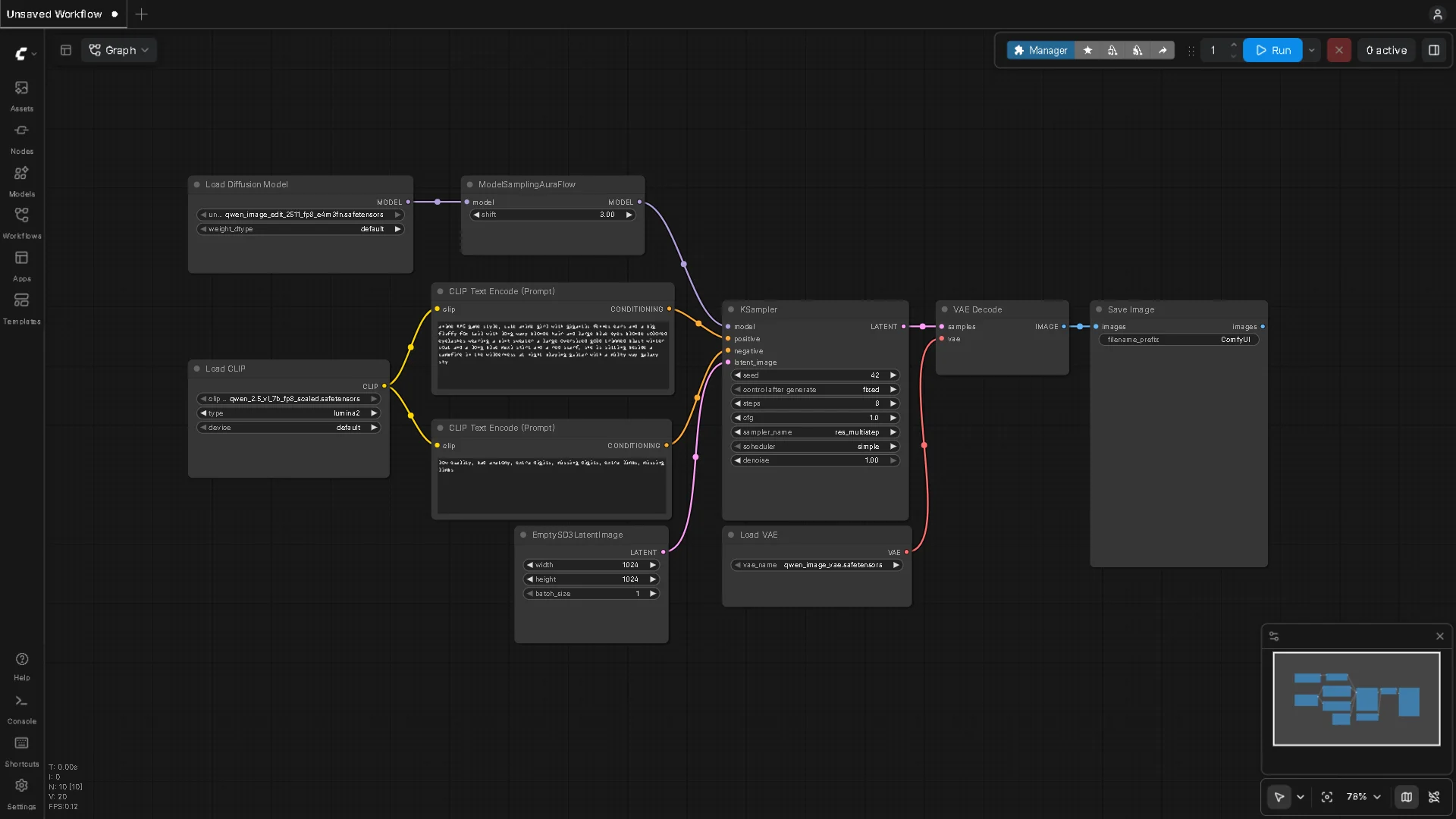
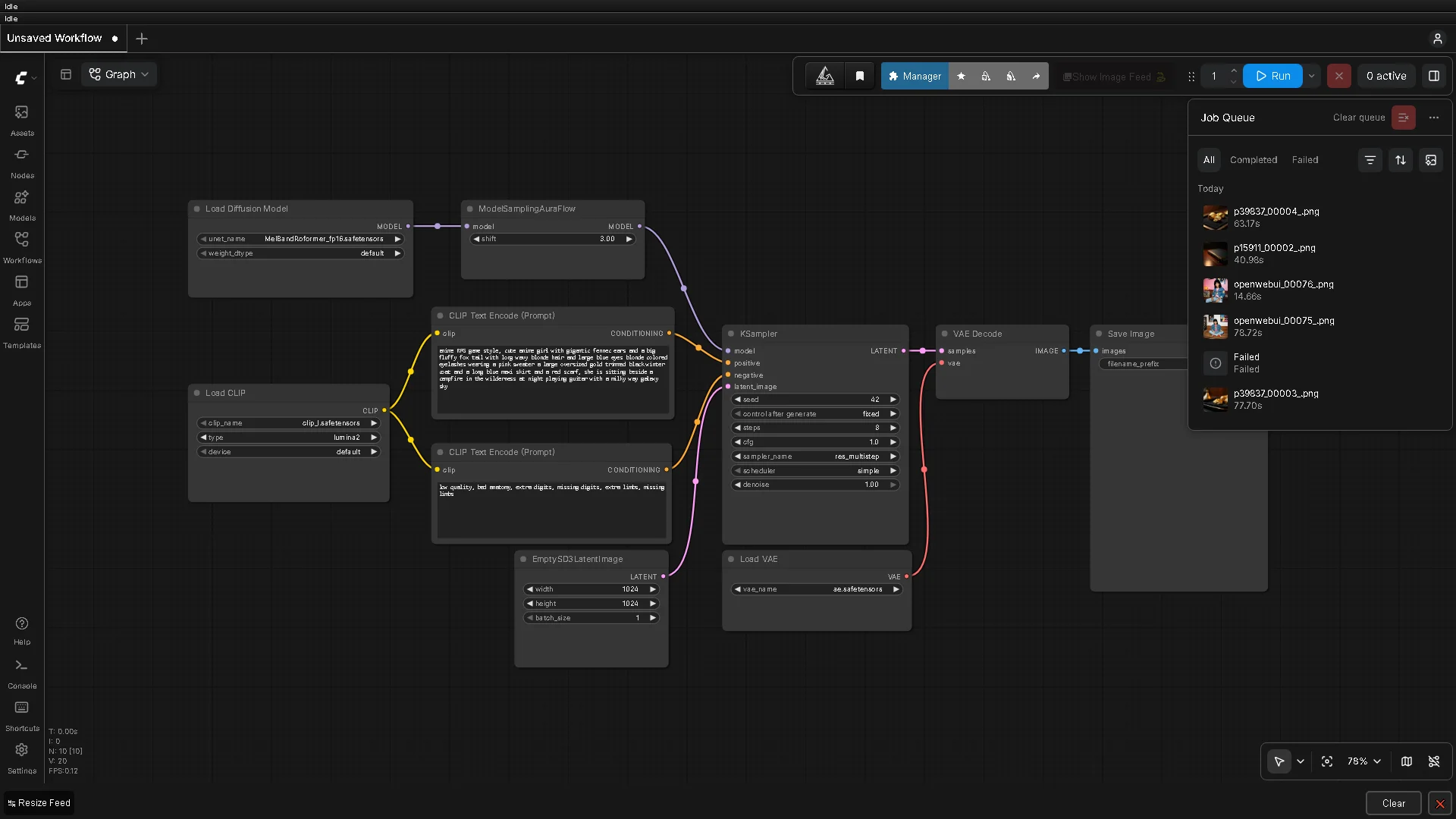
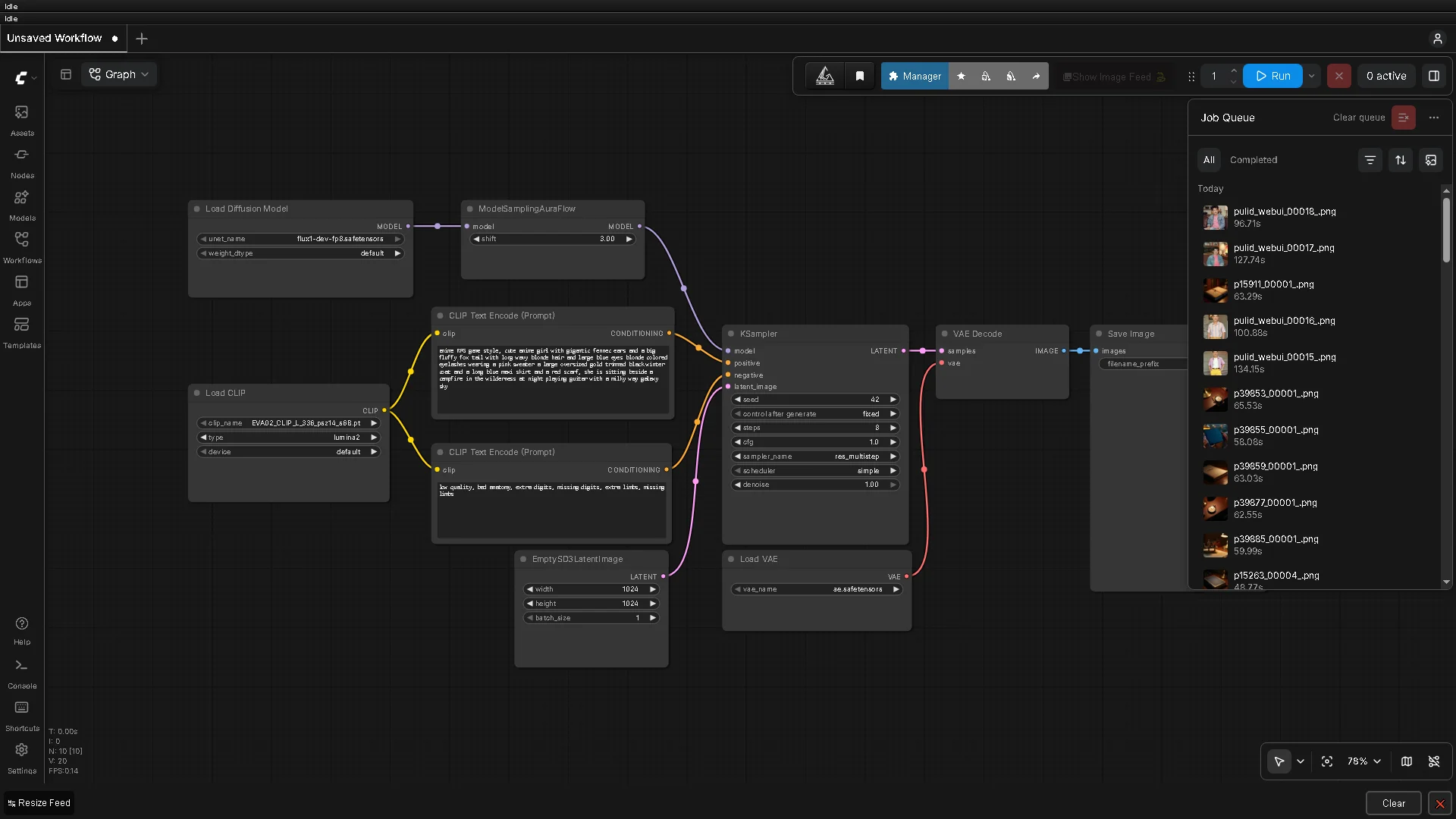
- Our image kitchen is a "multi-burner" design: ComfyUI on the i9 GPU0 (:8188), GPU1 (:8190), plus one more burner on the AMD box — a dispatcher (comfy-router) on the NAS keeps sending jobs to the freest burner
- Thai speech: VoxCPM2 on the i9 (:9499) — used both to read answers aloud and to narrate videos
- Speech-to-text: Whisper (:9200) — used to produce video subtitles
Apply this recipe as soon as the model is installed on the machine (chapter 3) — and come back to it every time you change model or version, because "good parameters" belong to one specific pair (model + dataset) and do not transfer for free across models
How-tohow to
Kitchen layout: 3 burners + a dispatcher:
- Install ComfyUI one burner at a time (one GPU per instance, different ports) — download from github.com/comfyanonymous/ComfyUI
- Put every burner under the GPULAW rule: the image-rendering window is 17:30–19:30 every day — outside the window the GPUs stay free
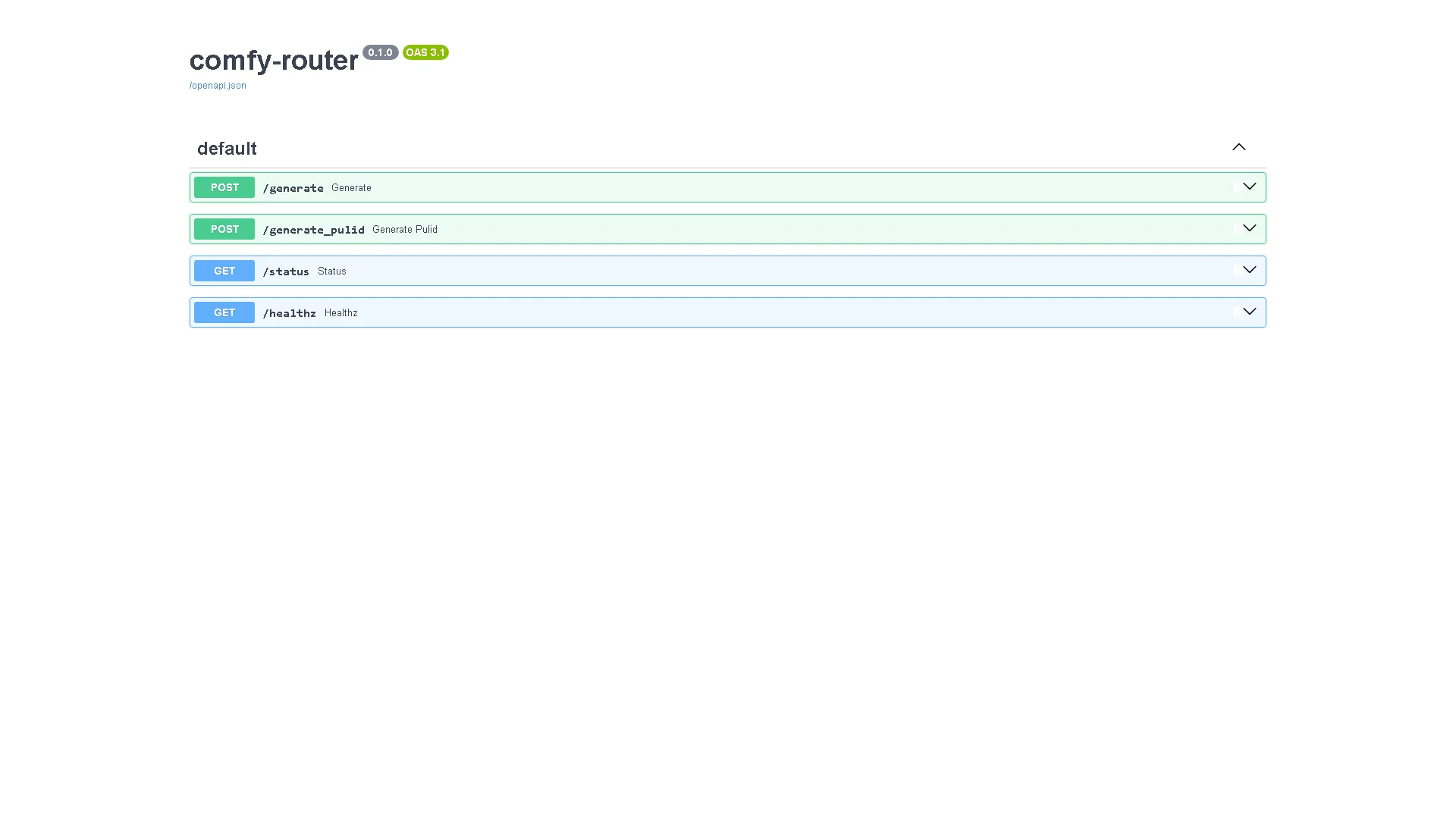
- The comfy-router dispatcher (FastAPI) on the NAS :8788 accepts a single request, then forwards it to the least-busy burner — /free shows every burner's status in real time
- Voice: run VoxCPM2 and Whisper as services on the i9, then enable the TTS/STT buttons in the WebUI
- End-to-end test: request an image from the chat page (type "draw a picture...") and press the speaker button to have the answer read aloud
Real photos of all three burners are in the figures section below — taken from a system that was actually running at the time
If anything gets stuck → chapter 9
Layer 0 first — the completion safety floor (the most important part, yet the one people overlook): the "strong Thai, weak Thai, alternating" behavior we once hit (thai_ratio swinging 0.72–0.92) is rooted not in the prompt but in truncated or empty answers — the answer ceiling (num_predict) was too small and collided with the model's "inner thoughts"; once the floor is raised correctly, the swing shrinks to a band of just 0.036 and all 300/300 answers come back complete:
# Safety floor (set this before tuning any prompt)
num_ctx: 32768          # below this, long Thai reports get their tails cut off
num_predict: 8192       # long-form writing
num_predict_chat: 2048  # normal chat
num_predict_bot: 1024   # LINE/Telegram bots (30-second UX budget)
think: false            # bot path only — reason below
Source: a 300/300 completions test, Sep 2026 — details in docs/thai.md
The "thinking budget" trap for bots: a reasoning model with think on plus a small num_predict burns the entire answer quota on inner thoughts, then sends back an empty answer — our LINE bot genuinely hit this; the fix is pinning think:false + an answer ceiling sized to the job (already set up in chapter 4)
Layer 1 — the sampling parameters that passed the gate:
# Config A_bom_nothink — the only one of 4 configs tested to pass the 0.78 gate
temperature: 0.7
top_p: 0.8
top_k: 20
repeat_penalty: 1.05    # above this it wrecks code blocks
# Measured: thai_median 0.7821, Han 12 times/28 answers, 17.92 tok/s
Hypotheses the experiments knocked down: presence_penalty 1.5 does "not" make Thai worse (A/B n=23, no difference), and DavidAU's sampling formula did not beat the incumbent (0.7500 vs 0.7821)
Layer 2 — the system prompt recipe "Config G": a 4-part structure (the full 4,101-character version lives in the repo and on Hugging Face bomllm/turbo-thai-config):
- Identity + personality (a polite Thai assistant, finance/tech domain)
- Language rule: always answer in Thai (unless the user writes in another language) + absolutely never output Chinese characters (Han ban)
- Style rule: answer the question first, no padding, no made-up numbers
- Two example question-answer pairs (few-shot: one general, one report-style)
Config G's measured result: thai_ratio +0.029 over the rival prompt (the 95% CI excludes zero) and stray Chinese characters cut in half (35 → 15 per 100)
If anything gets stuck → chapter 9
Config exampleconfig example
The kitchen configuration principles we actually use:
# One burner = one GPU = one port
i9 GPU0 :8188   (ComfyUI — general image work)
i9 GPU1 :8190   (ComfyUI — PuLID face work)
AMD     :8188   (ComfyUI — third burner, overflow)

# Dispatcher on the NAS
comfy-router :8788
  POST /generate      -> auto-routes to the freest burner
  GET  /free          -> shows remaining VRAM on every burner

# Voice on the i9
VoxCPM2 TTS :9499   (Thai text -> speech)
Whisper STT :9200   (audio -> text, used for Thai subs)
The GPULAW 17:30–19:30 rule is written directly into the router's schedule — outside the window, jobs simply queue up without rushing any burner
Paste it in for real use — the LiteLLM route (chapter 4) + the file configs/sampling-recipe.yaml in the repo is the "receipt" for every value:
# The ready-made recipe for a 27B model on the Mac (the recipe running in production)
system_prompt : Config G (Thai only + no Chinese characters + 2 few-shot pairs)
temperature   : 0.7      top_p: 0.8     top_k: 20
repeat_penalty: 1.05     presence_penalty: 0.0
num_ctx       : 32768
num_predict   : 8192 long-form / 2048 chat / 1024 bots
think         : false on the bot path, true only on the deep path
Do not remix the values at random — every value here is backed by an experiment, and breakage hurts for real (one typo of repeat_penalty 8.0 = the whole batch of results ruined)
Pro tip — field-tested advicepro tip
FAQfaq
Q: Do older GPU cards work? — any RTX with 16GB is enough to start; below that you have to pick a smaller image model (SDXL instead of Flux)
Q: How natural is the Thai voice? — at the level of "comfortably understandable, usable for real narration"; we use it to produce a real YouTube video every week (samples at YouTube @icafefx)
For other questions see the FAQ
Q: And if the question is in English, which language comes back? — our standard recipe always answers in Thai first (the business owner chose it that way); if you want technical English answered in English, there is a route-level override — but be prepared for the Thai purity number to shift
Q: A new model comes out — do we start over? — the same protocol can simply be re-run (the bench_thai.py script in the repo); a challenger must beat the incumbent with a CI that excludes zero before it gets promoted
See alsosee also
- Chapter 1 · The 4-machine architecture — where the kitchen sits in the big picture
- Chapter 3 · Mac Mini — the home of the model that takes this recipe
- Chapter 7 · Bots — where think:false makes the difference
- Chapter 8 · Content pipeline — the heaviest user of the kitchen
- Hugging Face — the full Thai recipe set
Figuresfigures
Real screen recording for this lesson · click play to hear the summary · not investment advice
▶ Watch the manual video: https://youtu.be/O4hM39cgDCY