Upgrade runbook and troubleshooting
Upgrade runbook and troubleshooting
TL;DR — the 30-second summarytldr
The final chapter is the "survivor guide" — every other chapter points back here when trouble hits. It has two parts: upgrade discipline that keeps the system from breaking during upgrades, and the fix recipe for when it breaks at 2 AM
When to usewhen to use
Come back to this chapter whenever: you are about to upgrade any component, you hit an odd symptom, or you read the words "if you get stuck anywhere" in another chapter
How-tohow to
The 6 rules of upgrading (none negotiable):
- Pin the version of everything — latest is absolutely forbidden (we have been bitten by latest changing behavior under us)
- One component per time window — upgrade two things at once and break, and you learn nothing at all
- Back up before touching — dump Postgres + snapshot the config, and it must be "really restorable" (a backup never restored is a rumor)
- Write the rollback plan before typing the upgrade command
- Run the 6-probe check after every change — all six green or roll back
- Outside peak hours — after 23:00 every day, avoiding our own automatic restart window
The 6-probe check set (run after every change):
The full original lives in docs/upgrade.md in the repo — copy it into your own script freely
Common symptoms with hands-on fixes:
| Symptom | Common cause | Fix |
|---|---|---|
| Bot answers blank | think enabled + low num_predict | pin think:false on the route (chapter 7) |
| Text streams slowly, in bursts | two models resident until swap kicks in | evict the secondary model (keep_alive 0), then see chapter 3 |
| Cannot log into the chat site, rapid 401s | key/session expired | check the master key in .env, then up -d again |
| Thai answers start showing Chinese characters | system prompt lost / the new route is missing Config G | go back and check the route + chapter 12 |
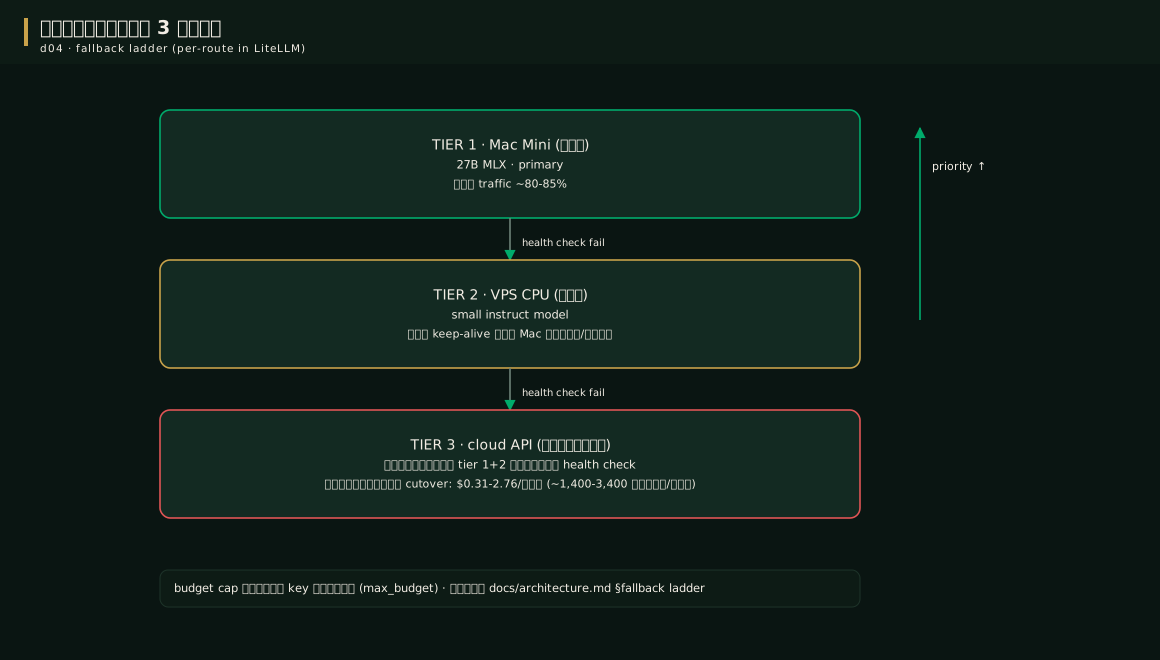
| Today's cloud bill abnormally high | the Mac was down long enough that Tier 3 worked hard | check the hourly spend log + find the cause on the Mac |
| Updated and broken | floating version / params silently dropped | roll back to the old tag first, find the cause afterwards |
The 2 AM recipe (broken at night): (1) do not debug deep while sleepy — roll back to the old tag first (2) save the last 30 minutes of logs into an incident folder (3) sleep (4) write a one-page post-mortem within 48 hours naming the root cause + which rule, had it been followed, would have prevented this incident, then add that rule to the manual
Config exampleconfig example
The popular upgrade steps in short (full version in docs/upgrade.md):
# --- Ollama on the Mac ---
brew upgrade ollama          # then restart the service
ollama --version             # client == server must match
ollama ps                    # the main model must be resident again
# the first warm-up chat must be < 5 s to count as done

# --- LiteLLM / WebUI on the VPS ---
docker compose pull litellm          # the pinned tag
docker compose up -d litellm         # recreate just this one
docker compose logs -f litellm       # watch boot: parse config + DB migrate
# after upgrade: diff /model/info against the pre-upgrade snapshot + run the 6-probe smoke
The top risk = database migrations, so dump Postgres every time before pulling
Pro tip — field-tested advicepro tip
FAQfaq
Q: How often should I update? — an urgent CVE = immediately but by the 6 rules; normal = once a month in a night window; macOS = only in a quiet week
Q: So broken you do not know what to do? — roll the whole stack back to its previous tags (possible because everything is version-pinned + you have dumps), then hunt the cause on a copy, not on the live system customers are using
For other questions see the FAQ
See alsosee also
- Chapter 15 · Security — check before and after upgrades
- docs/upgrade.md — the full English version
Figuresfigures
Videovideo
Real screen recording for this lesson · click play to hear the summary · not investment advice
▶ Watch the manual video: https://youtu.be/O4hM39cgDCY