PART 4 · Putting it together
Find your own entries + real cases
Confluence = several tools seeing the same thing The win rate rises, and when enough of them agree you can enter — no need to wait for every single one. This chapter walks the whole process end to end, then closes with 2 real case studies
Chapter summary video
Real chart screen recording · not investment advice
Listen to the TL;DR summary of this chapter
TL;DR
Confluence = several tools agreeing at one spot = a higher win rate — the system calls entries from confluence (Fib + Elliott + LQ zone + Gold Meter + Range Filter flip); enter when enough of them line up; the Buy/Sell label is only the final confirmation. Then 2 real case studies — Case 1: full confluence, entered and it paid off / Case 2: incomplete confluence, so no entry (a lesson in holding back)
1 · What confluence is
Confluence = several tools saying the same thing at one point — for example Fib + Elliott + LQ zone + Gold Meter + Range Filter all pointing the same way; the more tools agree, the higher the win chance
Confluence = several tools agreeing at one spot
2 · What the chart looks like
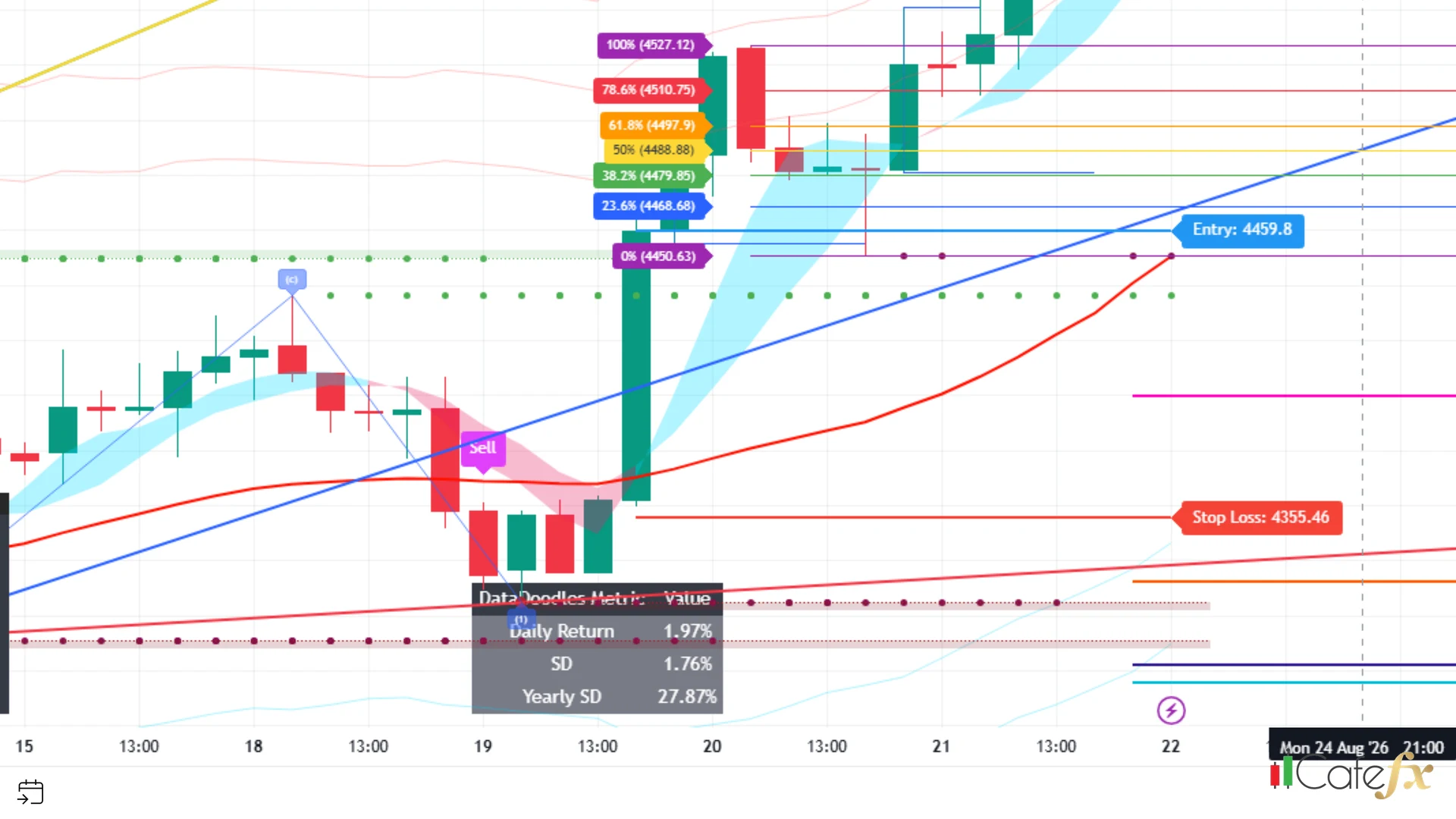
On the chart you see 7 Fibonacci levels + Entry/SL/TP + Gold Meter + LQ zone in a single frame — this is the confluence the system uses to call entries
3 · How to read the entry signal
The system calls entries from confluence — the Buy/Sell label the indicator draws is only the final confirmation; a label appears only after the Range Filter has flipped direction and passed the noise-control gates (Gold + Reversal (2 gates by default) — extra TF counts only when MultiTF is on)
Label format: Buy = an aqua label below the candle, pointing up · Sell = a fuchsia label above the candle, pointing down — the color and position tell you the direction instantly, with no numbers to read
What to do when you see a label: do not jump in immediately — the label is only the final confirmation; check the confluence (Fib + Elliott + LQ zone + Gold Meter) in the next step first, and enter only when enough of it lines up
The arrow labeled system entry point points at the confluence (Fib + Elliott + LQ zone + Gold Meter agreeing) around the blue Buy label beneath the candle — this is where the Range Filter has flipped up through the control gates, the starting point of a long trade
4 · Find entries yourself in 5 steps
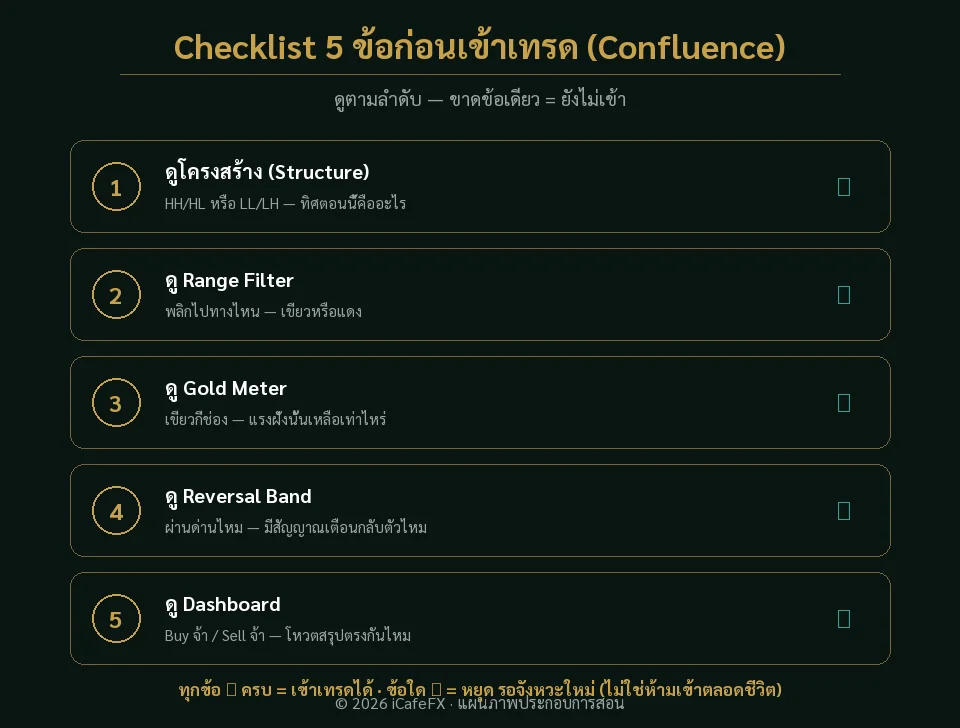
Here is the step-by-step process a beginner can follow one step at a time:
- Read the trend position — the Trend Ribbon / Range Filter says up or down (direction)
- Read the 7 Fib levels — which Fib level is price at (the retracement position)
- Read the Elliott wave — which segment it is in (1,2,3,4,5 / a,b,c)
- Read the LQ zone — the Swing LQ box marks the liquidity points (highs/lows)
- Wait for the system to confirm — a Buy/Sell label appears + Gold Meter points the same way + Range Filter flips = enough to enter (then pick your way in and set SL/TP, see sections 5-7)
Follow the 5 steps in order and do not skip any — skip one and you enter at the wrong spot
5 · Two ways to enter
Once enough confluence lines up, there are two ways in — this is the trader's choice, not indicator behavior (the indicator only draws the signal; entering is up to you)
Method 1 · Enter at market on the close of the signal candle — the entry price equals the close of the signal candle, exactly on the Entry line, so you are guaranteed to get in, though in fast markets slippage can push the real price slightly off Entry
Method 2 · Place a pending limit on the Entry line and wait for the pullback — park a limit order on the Entry line and wait for price to pull back and touch it; the fill sits exactly at Entry, which is better, but if price never pulls back you miss the trade (it runs away without you)
Fast market / must get in → Method 1 · Market with a pullback rhythm / want a better price → Method 2 (accepting the risk of missing the trade)
6 · How to set the SL
When you place the pending order (Method 2) or enter at market (Method 1), set the SL at the same time on the SL line the indicator has drawn — never leave it out, no exceptions
SL = ATR(14)×1.5, constant — meaning: high volatility = the SL line sits far away (leaving room for price to breathe), low volatility = the SL line comes in close (a quiet market tightens the line) — the distance self-adjusts to market conditions, nothing for you to set
Never set the SL as a fixed percentage of a given pair (for example 1% of XAUUSD) — the SL distance must follow real volatility (ATR), not a dead-fixed number
7 · TP 2 modes
Standard mode — TP1=1R, TP2=2R, TP3=3R, taking profit in batches at each R target, where R = the SL distance — closing step by step reduces risk as the trade progresses
Short-term mode — as soon as price touches the red AMA line (the smooth red Curve line) you may take profit early instead of waiting for 1R/2R/3R — the TA principle: mean reversion; price returning to the adaptive average (AMA) marks where short-term pressure is spent, so bank the profit before price possibly reverses
Taking profit early at the AMA line can forfeit extra profit if the trend keeps running — it suits quiet markets / weak trends, not strong trends
8 · What to do when confluence is incomplete
If your check shows the tools disagreeing (for example a signal exists but the Gold Meter does not confirm) = confluence is incomplete — do not enter; waiting for the next setup beats entering and losing
Incomplete confluence = no entry, wait for the next one — nothing is 100%, only sufficient confluence makes the risk worth taking
"When enough confluence lines up, you can enter — no need to wait for every single tool to agree"
The case studies in this chapter are examples where the conditions happened to align — they do not include statistics on cases that failed the conditions; read them as worked examples of how to look, not as a success rate
9 · Case 1: full confluence
This example shows a system entry point — the Buy signal (the final confirmation) appeared at the start of an up-wave, and several tools agreed (full confluence):
- Direction — the trend was up
- Elliott — an up-wave
- Fib — support at the starting point
Result: price surged to 4575 = full confluence, entered, and it paid off
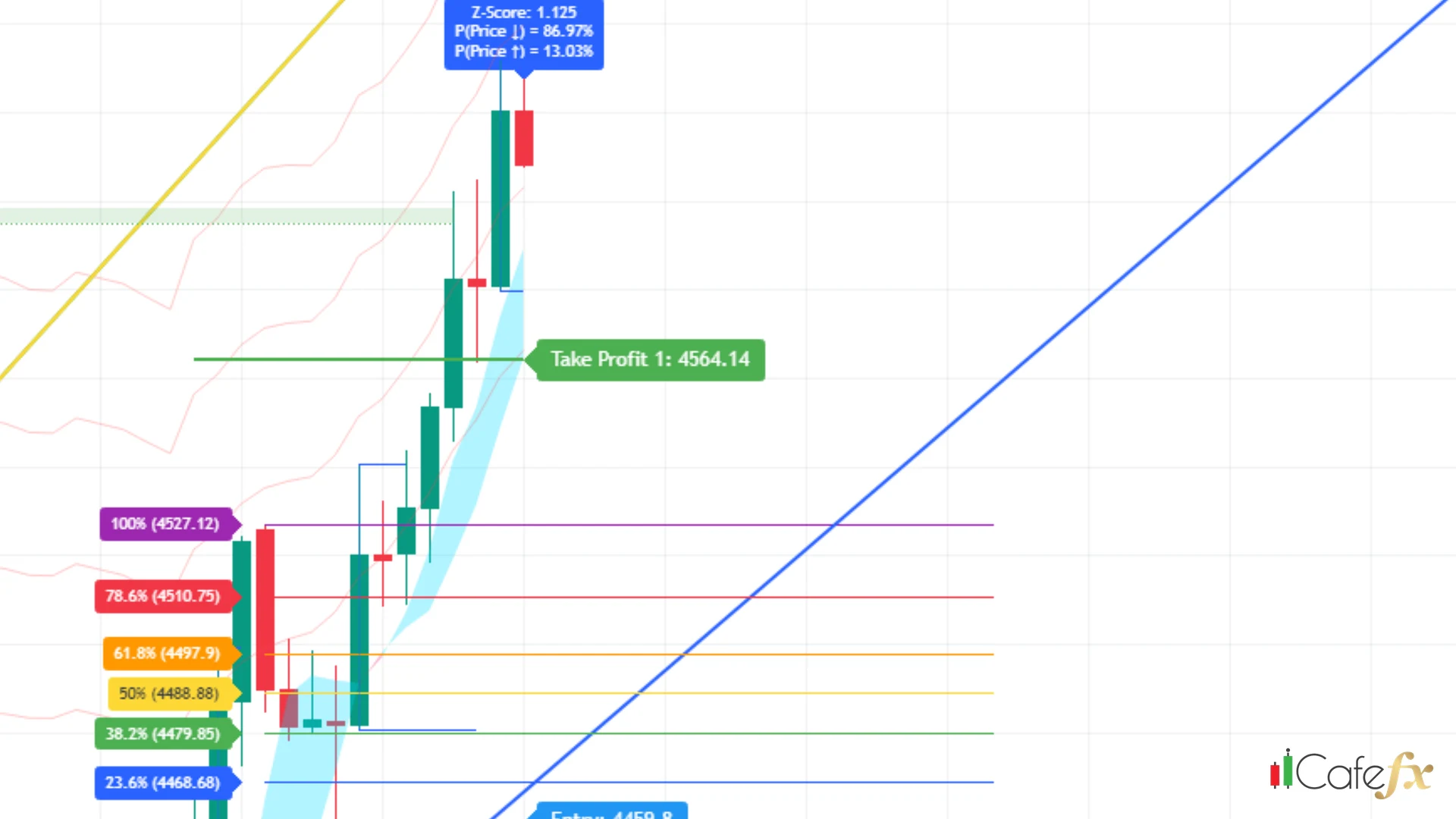
Standard mode — hold the long trade to the 4575 target (the target marked on the image), then take profit at the 1R/2R/3R targets measured from the SL distance
Short-term mode — do not hold to 4575; take profit when price pulls back down to touch the red AMA line (in the image the AMA line sits around 4550.87; price spiked to 4575 then pulled back near the AMA line, making that the short-term exit)
Comparison: short-term mode exits sooner + earns less · standard mode earns more + holds longer / carries more reversal risk — pick according to market rhythm (strong trend → standard, choppy market → short-term)
10 · Case 2: incomplete confluence
This example shows a Sell signal (the final confirmation) appearing at a top — at a glance it looks enterable, but check the confluence:
- Dashboard — the timeframes disagree (some up, some down)
- Gold Meter — it disagrees too
Result: incomplete confluence = no entry; wait for the next setup (a lesson in holding back)
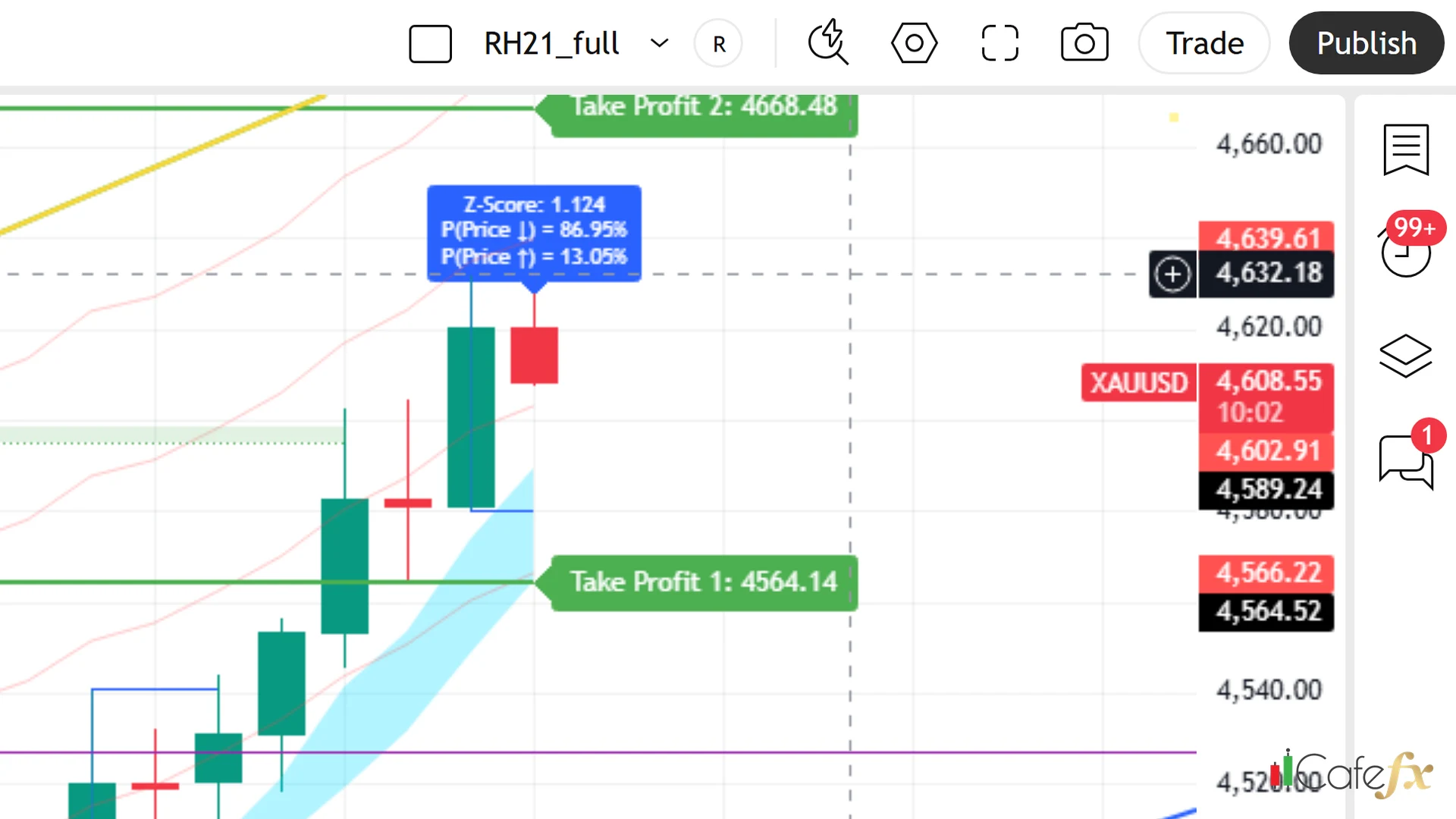
It looks enterable at a glance, but check the confluence first — incomplete means no entry
11 · Lessons from the 2 cases
Both cases in summary:
- Case 1 won — because Trend + Elliott + Fib agreed = full confluence
- Case 2 was skipped — because Dashboard + Gold Meter disagreed = incomplete confluence
The lesson: enter only on full confluence; incomplete = no entry — one rule that works in every situation
Sometimes not entering beats entering — knowing when to hold back is a core skill, not cowardice
"Sometimes not entering beats entering — knowing when to hold back is a core skill"
This chapter in one line
Confluence = several tools agreeing; enter when enough of them line up, not enough = no entry, wait for the next one — Case 1 (full confluence: Trend + Elliott + Fib) won, Case 2 (incomplete: Dashboard + Gold Meter disagreed) was skipped: enter only on full confluence