PART 2 · Tools
Reading Fibonacci with Redhat
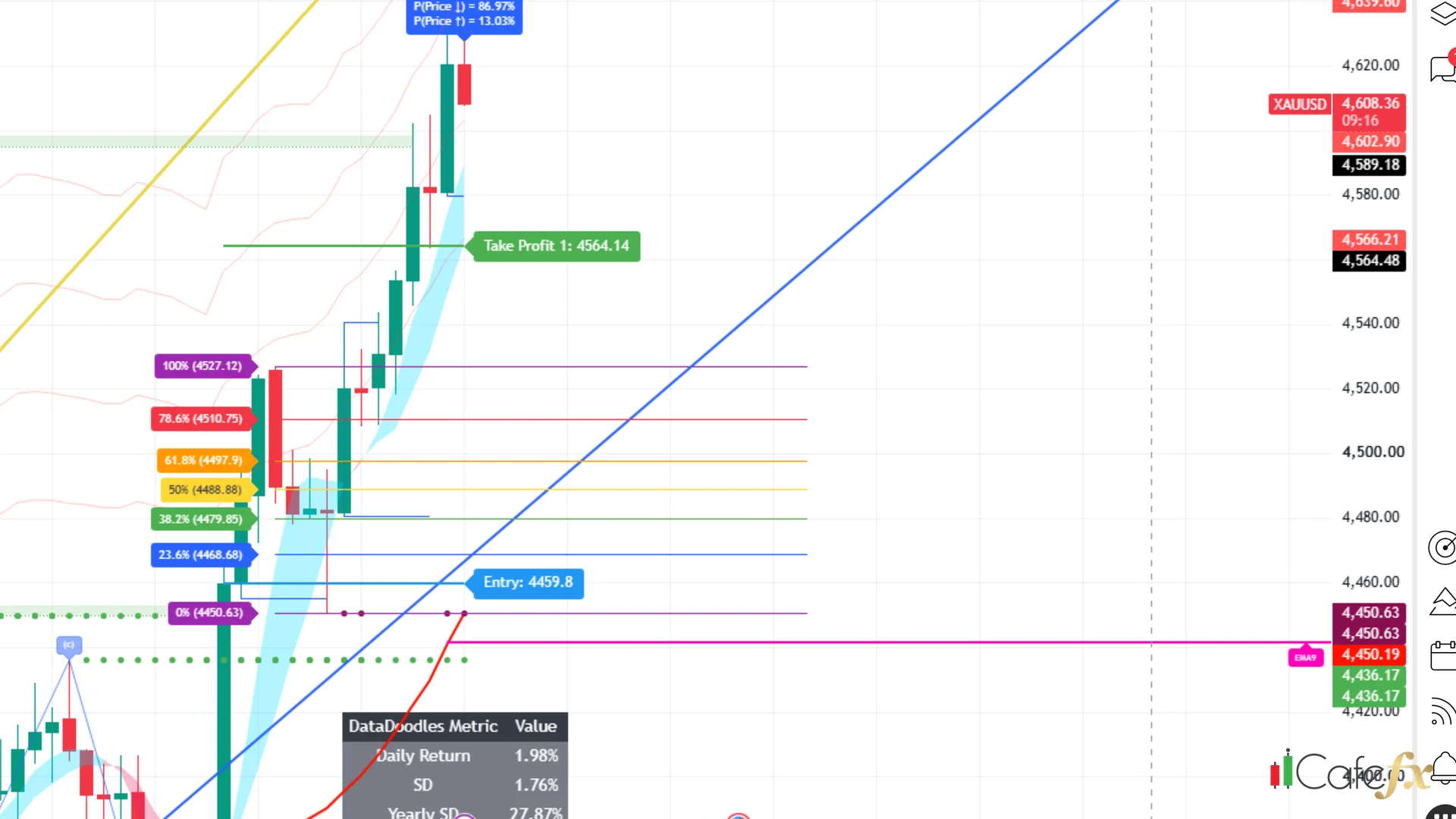
Fibonacci is a ruler for price distance — it takes the run from the lowest point to the highest point of a wave and divides it into 7 levels, telling you where price usually pulls back to if it pulls back at all. Redhat opens Fib right on the screen, no manual drawing needed
Chapter summary video
Real chart screen recording · not investment advice
Listen to the TL;DR summary of this chapter
TL;DR
Fibonacci (Fib) is a ruler Redhat draws on the chart — from the lowest point to the highest point of the running wave, divided into 7 levels; the middle zone 38.2-61.8 is where price most often flows back to, but other tools must agree before you use it — never enter just because you see it
1 · What is Fibonacci
Fib is a distance ruler — taken from the lowest point (swing low) to the highest point (swing high) of the latest running wave, then split into 7 levels; level 0% = the low, 100% = the high
Normally you have to draw it yourself in TradingView, but Redhat opens Fib on the screen for you — just flip the Fibonacci switch in the settings page and the 7 level lines appear
Fib = a ruler from low to high split into 7 levels, showing where price usually pulls back
2 · What are the 7 levels
Redhat draws a fixed set of 7 Fib levels: 0 / 23.6 / 38.2 / 50 / 61.8 / 78.6 / 100 — every level carries a name + price label
The golden zone = 38.2-61.8 is the middle band, where price flows back most often — the area we care about most
Read them as 7 separate lines — if they clump into a pile the price range is tight, so widen the framing until you can read each level's value
3 · How to spot Fib on the Redhat screen
Turn on the Fibonacci switch on Redhat together with the core system — run only Fib + the core system; do not switch on so many other tools that the lines crash into a clump you cannot read
Once the 7 level lines are on screen with price labels = it is ready to use
4 · What the small green triangle is
Sometimes a small green triangle appears on a Fib line — many people mistake it for a buy point. The truth: it only says price touched the Fib line, it is not a breakout signal
And this input is off by default — it is not an order trigger
Green triangle = a touch of the line, not an entry — never use it as your reason to place an order
"Fib never promises price will pull back at a given spot 100% — it says, if a pullback comes, this is where it usually lands"
5 · How to use Fib
The right way to use it: wait for price to flow back into the golden zone 38.2-61.8, then check whether other tools agree — structure, Elliott and Gold Meter echoing each other is when you consider entering
- Watch — has price entered the golden zone 38.2-61.8 yet
- Check — do the other tools (Swing/Elliott/Gold Meter) agree
- Wait — is there a big signal + Entry/SL/TP on screen; only then enter
Entering the moment price touches Fib with no other tool agreeing = risky; a single signal is not enough
This chapter in one line
Fib = a distance ruler from low to high split into 7 levels; the golden zone 38.2-61.8 is where price usually pulls back, but other tools must agree