Spread Filter / Alerts / Settings
⏱ ~3 min · 693 words · English
The settings that make WARP run more smoothly — set them once and be done: block wide spreads, get alerts on your phone, adjust the screen

Chapter summary video · panel screen + voice (Demo · 2:39)
Demo screen recording · click play to hear the summary · not investment advice

Quick summary
- The Inputs window (F7) is where every setting lives — not on the panel
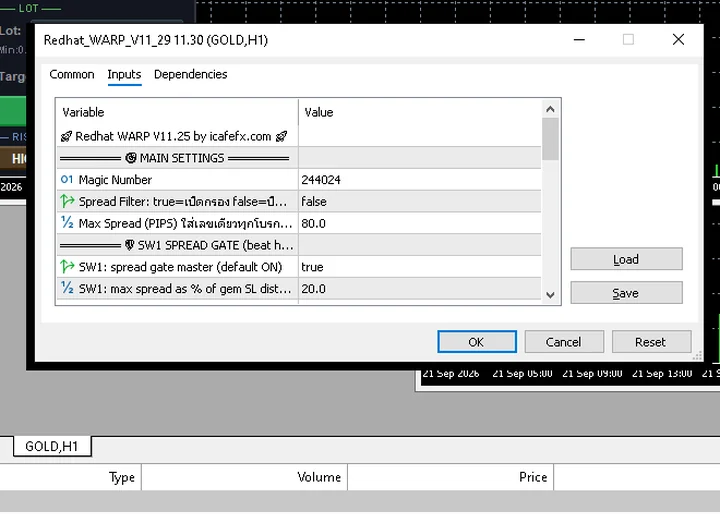
- Spread filter: caps M1/M5 at 35 points · H1/H4 at 50 points (master switch InpSpreadGateOn = true)
- Magic Number 244024 is the tag WARP stamps on its positions
- Crypto: turn the Spread filter off or no position will open (chapter 9)
What is on the Inputs screen
Press F7 on the chart to open Inputs — the groups worth knowing: the position tag number (InpMagicNumber 244024) · the buy-sell price gap filter (spread · the bid-ask difference) · notifications · panel display (InpShowPanel)
Filter values read from a real screen: InpSpreadGateOn = true · InpMaxSpread_M1 = 35 · M5 = 35 · H1 = 50 · H4 = 50 · InpSpreadSpikeGuard = true — the system skips entering whenever the spread blows past the cap for that TF
Commonly changed settings
Turn on alerts: the Alert fields in the Notifications group — tick push notifications on in the MetaTrader 5 mobile app first, then the EA's messages will reach your phone (the field names sit in the same group on the Inputs screen)
Hide the panel from the chart: InpShowPanel = false — the chart goes back to a clean full screen, while the EA keeps working exactly as before
Crypto BTC/ETH: spreads run far wider than gold — turn the filter off first, otherwise the system will never open a position (same point as chapter 9)
Pro Tip · Mr. Bom
The less you touch the Inputs screen, the better — I actually change only two things: turning on mobile alerts, and turning off the spread filter when trading crypto. Everything else stays at factory defaults; tested values beat our own guesses. Try every change on Demo first — each value you change carries real risk
FAQ
⚠️ For educational purposes, not investment advice · always try Demo first · screenshots from a demo account
Related chapters
Get Redhat WARP free via LINE @icafefx
Add LINE to receive the EA + manual + usage guidance · works on any MT5 broker that offers gold · always start with a demo account