How the EA finds entry timing
⏱ ~4 min · 794 words · English
Want to know how WARP looks at a chart before deciding to enter a trade? This chapter shows you the tools it uses to read the market.
Many people ask: does the EA enter blindly? No — I designed WARP to be strict. It will not enter until several layers of conditions all line up, like a trader who waits for a good setup instead of chasing price.

Chapter summary video · panel footage + voice (Demo · 3:14)
Footage from a demo account · press play to hear the summary · not investment advice
Quick summary
- WARP does not enter at random — it waits for several layers of conditions to line up
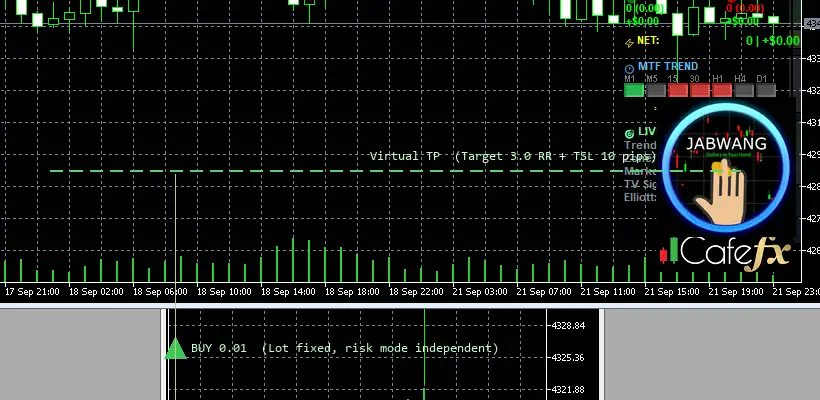
- Standard example trade: BUY 0.01 on GOLD · SL = 1R · virtual TP = 3.0R · TSL 10 pips · added positions 50 points (5 pips) apart · no more than 3 positions
- Internal indicators: trend · Fibonacci · liquidity — see the combined result on the right panel
- A green AUTO button is the approval to enter · red means the system is paused
Conditions before entering
WARP stacks a set of filters: trend direction (the price's overall bias) · Fibonacci levels (price retracement lines) · and liquidity (trading volume) — a trade only fires when none of the three layers conflict.
You do not configure these indicators yourself; the system reads them internally — what you can see is the summary: MTF TREND on the right panel (e.g. MIXED 0/3) plus the Trend and Market readouts in LIVE SIGNALS.
An example trade, number by number
What the system aims at: BUY 0.01 on GOLD · SL = 1R · virtual TP = 3.0R · TSL 10 pips · added positions 50 points (5 pips) apart · no more than 3 positions.
In plain words: buy gold with the smallest lot, 0.01 · accept a loss of 1 unit of risk (1R) · aim to exit at 3 units of profit (3.0R) through the virtual TP · along the way a trailing stop (TSL) follows price at 10 pips · if price runs well, the system may add positions, 50 points (5 pips) from the first, up to 3 positions.
Chapters 5 and 10 use this same set of numbers — if you find figures that do not match somewhere, that page is outdated.
Pro Tip · Mr. Bom
Before switching on AUTO, I want you to check the entry picture on the right panel every single time: MTF TREND must not contradict the setup you are waiting for. Seeing a downtrend while waiting for a buy is fighting the wave — better to keep waiting. Test on a demo account first; the risk is real even when every condition lines up.
FAQ
⚠️ For education only, not investment advice · always try Demo first · images from a demo account
Related chapters
Get Redhat WARP free via LINE @icafefx
Add LINE to receive the EA + manual + usage guidance · works on any MT5 broker that offers gold · always start on a demo account