Risk & Lot
⏱ ~4 min · 745 words · English
Master risk control first and profit will follow on its own — that is what keeps you in the market for the long run.

Chapter summary video · panel footage + voice (Demo · 3:31)
Footage from a demo account · press play to hear the summary · not investment advice
Quick summary
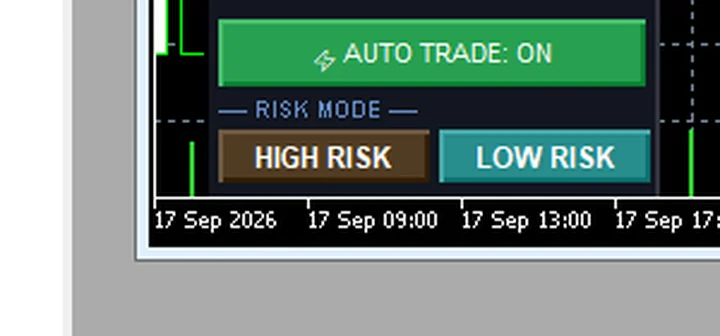
- Only two risk buttons exist: HIGH RISK and LOW RISK (LOW is the default)
- The risk buttons do not change Lot — Lot is controlled in the Lot field, default 0.01
- Max Orders 3 positions · added positions 50 points (5 pips) apart · not an unlimited martingale
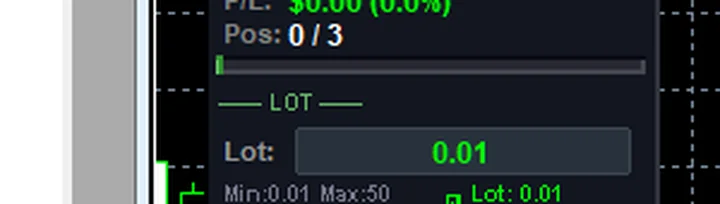
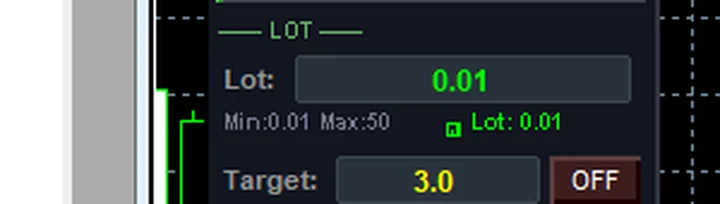
- Gold: Lot 0.01 (Min 0.01 · Max 50) — always start at the smallest size
WARP's real risk controls
WARP has two real switches: the AUTO button on the toolbar (green = hunting for setups · red = stopped) and the HIGH RISK / LOW RISK button on the panel (default LOW) — there is no separate AI mode to choose; the AI MODE button is a slot reserved for the future.
I tested on a demo account: pressed HIGH RISK and read the Lot field — still the same 0.01 · switched back to LOW RISK — same again. Conclusion: the risk button does not scale position size; it controls the system's internal operating criteria.
The real size control is the Lot field: default 0.01 · on gold, Min 0.01 and Max 50 — start at 0.01 and stay there until you understand your own drawdown.
Position limits and the numbers
Read these three values off the panel: Pos 0/3 · Max Orders 3 · Add (pts) 50 — up to 3 stacked positions, each 50 points (5 pips) apart — the system adds positions under a hard limit, not as endless doubling.
Target 3.0 = the R:R goal (three units of return per unit of risk) · standard example trade: BUY 0.01 on GOLD · SL = 1R · virtual TP = 3.0R · TSL 10 pips · added positions 50 points (5 pips) apart · no more than 3 positions.
Magic Number 244024 is the EA's ID, used to tell WARP's positions apart from your manual ones (see chapter 12).
Pro Tip · Mr. Bom
Before approving a bigger lot, I give myself a single test: how many losing trades in a row can I watch and still stay calm? If the answer is no more than three, I stay at 0.01. The risk is real — the position limit helps, but the final control is position size. Always test on a demo account first.
FAQ
⚠️ For education only, not investment advice · always try Demo first · images from a demo account
Related chapters
Get Redhat WARP free via LINE @icafefx
Add LINE to receive the EA + manual + usage guidance · works on any MT5 broker that offers gold · always start on a demo account