Opening and Closing Orders · Entry and Close Buttons
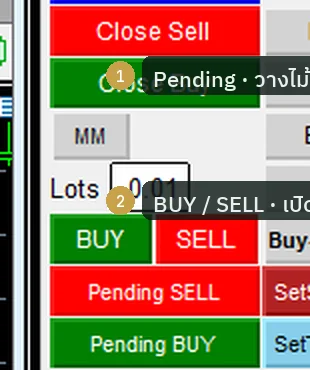
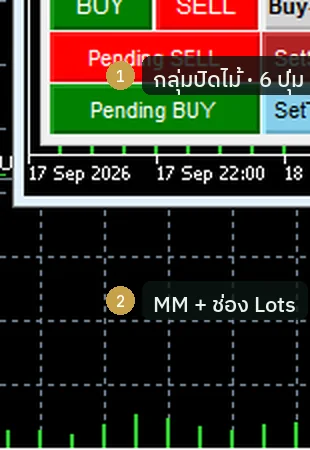
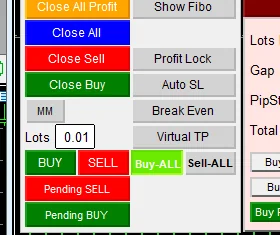
The entry and close buttons of Sword v4.67 · Pending BUY SELL place waiting orders · BUY SELL open instantly · Buy-ALL opens a run after auth · Close All per this chart · Close All Profit banks gains · delete pending · strip SL
Illustrations
Chapter video
Real MT5 screen recording · not investment advice · trading involves real risk
TL;DR
Sword offers three ways to open a trade · first, press BUY or SELL to open instantly at market price with the lot size in the box · second, press Pending BUY or Pending SELL and a grid dialog opens for setting up waiting orders · third, after passing auth there are Buy-ALL and Sell-ALL, which open a run of consecutive trades · the Reverse button does not flip an existing trade; it just ticks the grid preparation
Closing trades in Sword comes in several levels · Close Buy and Close Sell close one side at a time · Close All closes only the trades of that symbol (Sword trades by MagicNumber in this symbol — other symbols and other EAs are not closed) · Close All Profit closes only the trades in profit · DelPendingAll deletes all pending orders, while Remove All SL strips the stop-loss point from every trade · if you enable the trade list, each trade row also gets its own SL TP X buttons
When to use this feature
Use BUY SELL when you spot the moment and want in right away · use Pending when you want price to come to you first · use Buy-ALL only with high confidence and when you can carry the risk of several open trades · use Reverse when planning a grid in advance
Use Close All when you want to clear this chart's positions cleanly · use Close All Profit when you want to bank the profit and leave the losing trades open to watch a while longer · use DelPendingAll when the situation changes and the pending orders you placed are no longer wanted
How to use
Start with the Lots box on the bottom row of the panel: set your trade size first, then press a button · press green BUY to buy instantly, press red SELL to sell instantly · if you want to wait for a price, press Pending BUY or Pending SELL and a grid dialog pops up · that dialog has a Gap field, the distance between steps; a PipStep field, the step size; and Total grid, the total number of steps · once set, you can fire Buy Stop · Sell Stop · Buy limit · Sell limit across several steps at once
About Buy Reverse and Sell Reverse, let me stress this: their real job is to tick on the Buy Stop and Buy limit buttons, readying a grid — not to flip a trade's direction · Buy-ALL and Sell-ALL are post-auth buttons: hold the press and the system opens trades in a run, spaced by the seconds you set in the field · opening many trades at once is very risky; beginners should not rush into it
The close buttons sit together on the left side of the panel · Close Buy closes only buy trades, while Close Sell closes only sell trades · Close All closes every trade in the symbol of this chart — let me stress it: this chart only, so if you keep several gold charts open you must press on each one · Close All Profit closes only the trades whose combined profit is positive; trades in the red stay open
DelPendingAll deletes every pending order in one click — use it when you change your whole plan · Remove All SL strips the stop-loss point off every trade; this button is very dangerous, because your trades are left with no brake at all · if you enable the trade list option, each trade row has small SL TP and X buttons for managing them one by one
Pro Tip · Mr. Bom
Before using Pending, drag a price line and check whether the Gap you have in mind makes sense · do not set grid steps too tight, because trades pile up faster than you expect · and test every value on Demo first — the risk is real
I like closing trades in two beats · first press Close All Profit to bank the profit, then look at whether the remaining trades deserve to wait or should be closed · this builds the habit of not closing everything in excitement — but remember, trading always involves real risk
FAQ
Q: Does pressing Reverse flip my trade's direction?
A: No; Reverse only switches on the grid preparation — it is not a direction flip
Q: Which fields does the grid dialog have?
A: Gap for the distance between steps, PipStep for the step size, and Total grid for the number of steps
Q: How many trades does Buy-ALL open?
A: It opens a running sequence paced by the time you set, normally about ten trades per set, and only the symbol of that chart
Q: Why is nothing happening when I press a button — no trade appears?
A: Check whether the Algo Trading button on the toolbar is on; if it is off, the EA cannot send any order
Q: When is it safe to use Buy-ALL?
A: No time is guaranteed safe; you must be able to accept the risk of multiple open trades, and practice on Demo first
Q: Does Close All close trades on every chart?
A: No — it closes only trades in the same symbol as the chart where you pressed the button; other charts are unaffected
Q: Does Close All Profit close losing trades too?
A: No — it closes only trades with positive profit; trades in the red stay open
Q: How do I turn on the per-trade X button?
A: First enable the trade list option on the Inputs page, then each trade row gets its own SL TP X buttons
Q: When should Remove All SL be used?
A: Only when you deliberately want to remove the brake from every trade; normally it is not recommended, because your trades are left with no stop-loss point at all
Q: I pressed close but the trade is still there — what now?
A: Check the Algo Trading button first; if it is off, close commands cannot be sent
See also
Follow Mr. Bom on LINE
Ask further questions on LINE @icafefx · new version updates · signals and manuals, all free
Download Redhat Sword free
Semi-Auto Trading Panel · MT5 · XAUUSD · always try on Demo before any live account · trading involves real risk