What is Redhat Control Panel Sword · Installation and Setup
Sword v4.67 is an order control panel on MT5 for gold, used through on-chart buttons with a license-auth system · one-file install with embedded indicators · tick Allow DLL · automatic first-time license check · RHAI2 is a separate product
Illustrations
Chapter video
Real MT5 screen recording · not investment advice · trading involves real risk
TL;DR
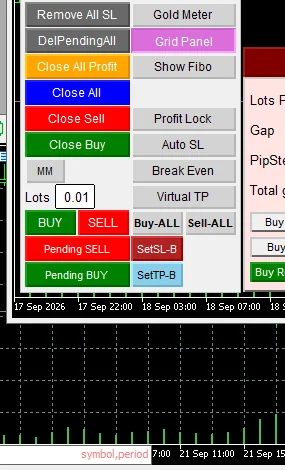
Sword is an order control panel placed on an MT5 chart, designed primarily for gold · everything is done through on-chart buttons, no other windows needed · the panel has two states: a pre-auth face and the full post-auth face · counting button names in this version's source code gives forty-one names, but on screen they appear in rotating sets
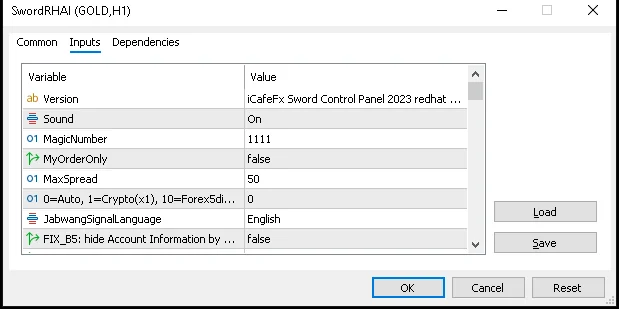
Installing Sword is shorter than you think, because all six indicators are already embedded in the EA file — no extra files to copy · the steps are: place the file in the Experts folder, restart the program, then drag it onto a gold chart · while attaching there is a box to tick allowing DLL files; you must tick it, otherwise the license system will not work · once attached, the system runs the first license check automatically
When to use this feature
Read this chapter before the others, to understand what Sword is and what it is not · use it to decide whether this tool fits your trading style
Do this once when you start using the panel · and reread it when you move to a new machine or reinstall the program
How to use
Let me explain it as simply as possible · picture a truck: Sword is the steering wheel and the buttons arranged ready to hand, while the driver is still you, always · the panel does not drive for you, it helps you give orders quickly and orderly
The license system matters a lot here · once you install the EA onto a chart, the system checks your license against a server one time · before the check the panel shows a basic set with M and S buttons in the right column · after passing, the full button set takes its place, including Buy-ALL · Sell-ALL · Virtual TP and Show Fibo · the details of these two states are covered in chapter 3
One more thing to separate clearly · on some installations you will see a chat panel on the right side of the chart; that one is called RHAI2 · RHAI2 is a separate product that ships alongside, with its own system — it is not a Sword button · this manual covers only the Sword panel on the left
Let me close with an important truth · no matter how good a tool is, the market never guarantees anything · always start with a demo account, test everything on Demo first — trading involves real risk
Follow along one step at a time · step one, place the Sword file in the Experts folder of your MT5 program · step two, close the program and open it again; you will see the Sword name in the Navigator window · step three, open a gold chart on the hourly timeframe, then double-click the Sword name in the Navigator
When the settings dialog pops up, find the row about allowing DLL files and tick it on · this box matters a lot, because the Sword license system runs through this kind of helper file · without the tick the panel comes up incomplete and cannot verify the license · then press OK
The last step is to wait · the EA contacts the server to check the license by itself; it takes only a few seconds · once it passes, the panel switches to the full set · a machine that has passed the check is remembered for about one hour; within that window you can close and reopen without checking again
Pro Tip · Mr. Bom
Before trading for real, ask yourself three questions: what is today's plan, where will I enter, and where will I exit · if you cannot answer all three, do not press any button yet · Sword helps you press faster, but the decision is still yours
Create one separate MT5 profile just for Sword · opening the program to a familiar layout removes a lot of stress · and always keep a note of which machines are installed and which day the license check passed
FAQ
Q: Is Sword suitable for beginners?
A: Yes, if you start from the four main buttons in chapter 3 and get comfortable on a demo account first
Q: Can Sword trade on my behalf?
A: No — it is an order-assist panel; the decisions are yours, and trading involves real risk
Q: How many buttons does the panel have?
A: Counting names in this version's code gives forty-one, but on screen they appear in rotating sets
Q: Do I have to pay?
A: The panel itself is free; download channel details are at the end of the manual
Q: What is the panel I see on the right?
A: That is RHAI2, a separate product — not a Sword button
Q: Do I need to copy extra indicator files?
A: No; all six indicators are already embedded in the EA file
Q: I forgot to tick Allow DLL — what now?
A: Right-click the chart, open the EA properties dialog, and tick it then
Q: Does the license check take long?
A: Normally a few seconds, and once passed the system remembers it for about an hour
Q: Can I attach it to other pairs?
A: Yes you can, but this manual focuses on gold; the values follow the gold scale
Q: If I move to another machine, do I have to set it up again?
A: You must reinstall and run the license check again; it does not take long
See also
Follow Mr. Bom on LINE
Ask further questions on LINE @icafefx · new version updates · signals and manuals, all free
Download Redhat Sword free
Semi-Auto Trading Panel · MT5 · XAUUSD · always try on Demo before any live account · trading involves real risk