Risk Management · MM, DD_Stop, MaxSpread
MM in Sword v4.67 is balance divided by a number, not one-percent risk · DD_Stop brakes at minus fifty · MaxSpread filters the spread
Illustrations
Chapter video
Real MT5 screen recording · not investment advice · trading involves real risk
TL;DR
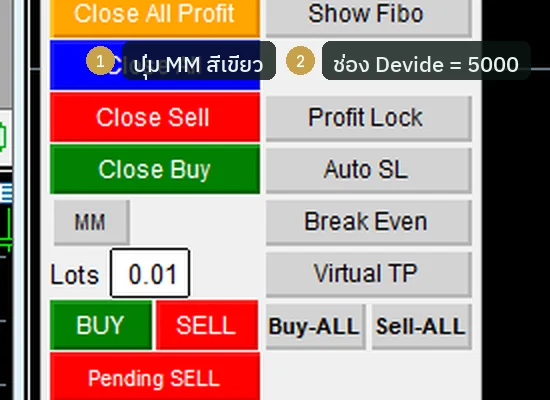
Trade sizing in Sword is easy to grasp like this · normally you type the lots yourself into the number field · press the MM button and that field becomes the Devide field: the system divides the money in your account by the number in this field to compute the lots · the default is five thousand · three more helpers exist: DD_Stop, which halts trading when the account draws down deeper than your setting, MaxSpread, which filters the spread, and MagicNumber, which separates Sword's trades from other trades
When to use this feature
Use MM when you want trade size to grow with the account automatically · use DD_Stop when you want a brake against deep drawdowns · use MaxSpread when trading around news, where the spread is wide (widening the filter means accepting a higher spread cost — suited to experienced users; beginners should keep the default for now)
How to use
In the row of the MM button you will also see a number field · when nothing is pressed, that field is the lots used to open trades · press MM until it turns green, and the same field changes role into the Devide field · a simple example: a five-thousand-dollar account with Devide set to five thousand gives a trade of about one lot; if the account grows to ten thousand, the trade grows to two · the formula is money divided by the number — it is not the one-percent risk rule that some places write about
DD_Stop is a switch on the Inputs page and it ships off · turn it on, and when the account draws down deeper than the set value the system stops first; the default value is minus fifty percent · MaxSpread defaults to fifty — if the spread is wider than that, the system opens no new trades · MagicNumber defaults to 1111 and is used to separate Sword's trades from other programs' trades in the same account
Pro Tip · Mr. Bom
I recommend starting the Devide field at a large number: trades stay small and you stay calm · once you understand the rhythm, lower it a little at a time · and keeping DD_Stop on, even at the default value, is still a good idea — trading involves real risk
FAQ
Q: Is MM the one-percent risk rule?
A: No — Sword's MM is the money in the account divided by the number in the Devide field; the default is five thousand
Q: I pressed MM — where did the lots field go?
A: It did not disappear; the same field changed role into the Devide field · press MM again to switch it back
Q: Is DD_Stop on by default?
A: On a fresh install it is off; you must turn it on yourself on the Inputs page · the default value is minus fifty percent
Q: What is a good MaxSpread value?
A: The default fifty works for gold in normal conditions; during major news you should raise it or wait until things calm down
Q: Do I need to change MagicNumber?
A: If Sword is the only program on one account, no; if you run several programs at once, give each a unique number
See also
Follow Mr. Bom on LINE
Ask further questions on LINE @icafefx · new version updates · signals and manuals, all free
Download Redhat Sword free
Semi-Auto Trading Panel · MT5 · XAUUSD · always try on Demo before any live account · trading involves real risk