Hedge · Grid and Display Buttons
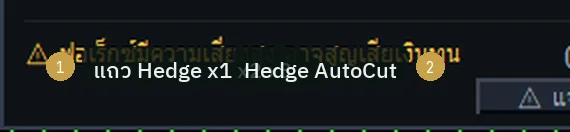
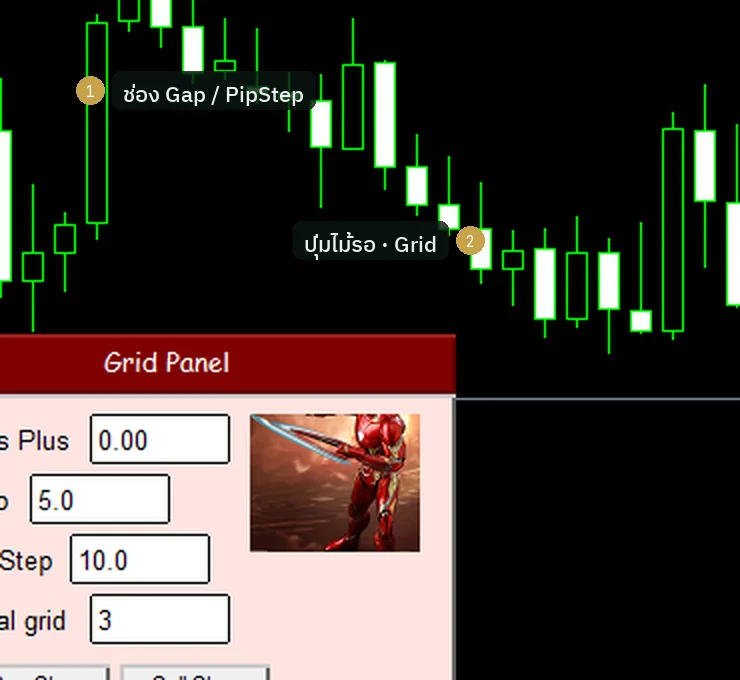
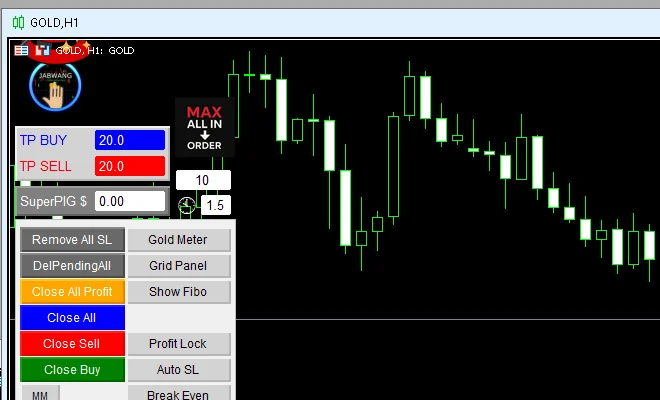
Hedge x1 x2 x3 and AutoCut must be enabled from Inputs first · AutoCut closes at one dollar · fixed-additive grid steps · display buttons: Gold Meter · Grid Panel · Show Fibo · Hide folds the panel
Illustrations
Chapter video
Real MT5 screen recording · not investment advice · trading involves real risk
TL;DR
The Hedge buttons of Sword are hidden from a fresh install — you must first turn on the ShowHedgeButton switch in the Inputs tab · once on, you get Hedge · Hedge x2 · Hedge x3 and Hedge AutoCut · Hedge opens an opposite-side trade the same size as what you currently hold · AutoCut closes the Hedge pair when profit reaches the target, default one dollar · the grid, meanwhile, opens its settings window through the Pending buttons
Sword has four screen-layout buttons · Gold Meter opens the gold signal panel built on the Jabwang-Mini core · Grid Panel opens the grid settings window · Show Fibo turns on the level lines on the chart and is a post-auth button · Hide folds the main panel down to a small button to keep the chart clean · also note, the account info box ships turned off by default
When to use this feature
Use Hedge when the main trade is caught in strong wind and you want to pause the damage temporarily — it is not a profit tool · use the grid only when you have a thoroughly worked-out averaging plan · both of these are advanced level; beginners should finish reading before using them
Use Gold Meter when you want a quick summary of gold signals · use Grid Panel when you want to set up a grid without going through the Pending buttons · use Hide when you want a full-screen chart
How to use
Turn on the Hedge button row first · right-click the chart, open the EA menu, open Properties, go to the Inputs tab, find the field named ShowHedgeButton, change it from false to true, then confirm · the red button row Hedge · Hedge x2 · Hedge x3 will appear on the right of the panel · the Hedge button opens an opposite-side trade equal to the total volume you currently hold · Hedge x2 and Hedge x3 open double and triple as their names say · risk grows with the multiplier, so think it through before pressing
The Hedge AutoCut button is the helper that closes the Hedge pair · the cut target lives in the Inputs field named ExitHedgeAutoCut_on_Profit, default one dollar — not fifty as some writings claim · once the Hedge pair's profit touches the target, the system closes that pair by itself · as for the grid, press Pending BUY or Pending SELL and the settings window appears · grid step spacing in v4.67 is fixed-additive, meaning each step is spaced equally; the lot multiplier of the ladder is covered in chapter 6
All the buttons sit in the right column of the panel — a button lit green means it is on, press it again to turn it off · Gold Meter opens the signal panel at the top of the chart, showing direction, stop points, and profit targets inside · Grid Panel opens the grid window that lays pending orders across several levels; setup details are earlier in this chapter · Show Fibo turns on the level lines over the chart
The Hide button sits at the panel edge — press it and the main panel folds down to a small button; press again and everything comes back as before · one last small note: the account info box you may have seen on some machines is turned off by default; to show it you must change it on the Inputs page
Pro Tip · Mr. Bom
My rule for Hedge is a single one: use it as a rest stop, not a profit machine · once the wind calms, decide and close one side — never hold a Hedge pair overnight without a plan · and practice everything on Demo first; trading involves real risk
Take a screenshot once your layout is done · when you move to another machine or reset the profile, a reference photo lets you rebuild it fast · and when reading Gold Meter signals, always remember it is a decision helper, not a command from heaven — trading involves real risk
FAQ
Q: Why can I not find the Hedge buttons?
A: The button row is hidden — turn on ShowHedgeButton in the Inputs tab first; the default is false
Q: At what profit does AutoCut close?
A: Read the value from ExitHedgeAutoCut_on_Profit; the default is one dollar and you can raise it per your plan
Q: Is Hedge x3 more dangerous than x1?
A: The risk is higher, because it opens triple the opposite-side trade — you need enough margin and a clear plan
Q: What step spacing does the Sword grid use?
A: v4.67 uses fixed-additive spacing, meaning equal distance between steps; you set it in the grid window
Q: Should beginners use Hedge?
A: Not yet — save it for when you understand margin and holding paired trades well; trading involves real risk
Q: Which indicator is Gold Meter based on?
A: It is a signal panel built on the Jabwang-Mini core, which ships embedded with the EA
Q: Why does nothing happen when I press Show Fibo?
A: This button belongs to the post-auth set — before you pass auth you will not even see it
Q: Does Hide make the panel disappear completely?
A: No — it folds down to a small button you can press to bring it back
Q: How do I get the account info box to show?
A: Turn it on from the Inputs page; the default in this version is off
Q: Do these buttons open trades?
A: No — this group purely toggles the display
See also
Follow Mr. Bom on LINE
Ask further questions on LINE @icafefx · new version updates · signals and manuals, all free
Download Redhat Sword free
Semi-Auto Trading Panel · MT5 · XAUUSD · always try on Demo before any live account · trading involves real risk