Every Input Field - Real Names from the Code
Every Sword v4.67 setting field, listed under its real code name · with a clear note on which fields you can edit, which values are hard-coded, and which fields are reserved for later
Illustrations
Chapter video
Real MT5 screen recording · not investment advice · trading involves real risk
TL;DR
The Sword Inputs page holds roughly sixty rows · most rows are simple divider headings that make it easy to scan · only a few fields are used often: MagicNumber · MaxSpread · ManualSl · SuperPIG, plus switches such as DD_Stop and ShowHedgeButton · the RadAV ladder multipliers and the grid spacing have no fields on this page, because they are constants in the code
When to use this feature
Use it as a dictionary when hunting for a field you want to change · use it on a fresh install, to see what each default is · use it when reading an old manual that uses legacy standard field names and you cannot find that field in the real panel
How to use
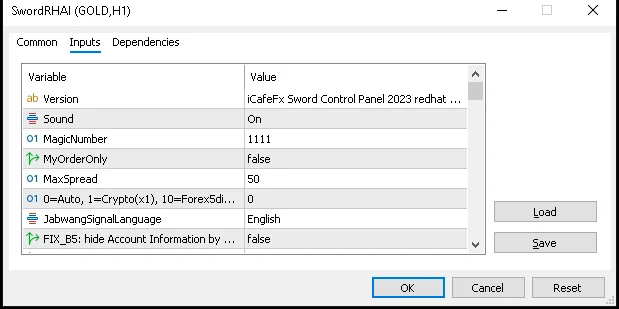
Open this page by right-clicking the chart, choosing the EA menu, then going to the Inputs tab · the table below lists the fields that actually take effect, in screen order · the long dash rows with no name or number are the window's own divider headings — you can skip them
| Field | Default | Meaning |
|---|---|---|
| Version | Help text | Version label; no effect on operation |
| Sound | On | Alert sound when pressing buttons or closing trades |
| MagicNumber | 1111 | Sword's trade ID number |
| MyOrderOnly | false | Tells the panel to manage only Sword's own trades (this value sets the true scope of the close buttons — read together with the Close All explanation in chapter 4) |
| MaxSpread | 50 | No new trades are opened when the spread exceeds this value |
| PipsMultiplier | 0 | Unit for measuring distance; zero lets the system figure it out on its own |
| ShowAccountInformation | false | Show the account info box on the chart |
| ShowPanelTitle | false | Show the panel name at the top |
| ShowGoldMeterButton | true | Show the Gold Meter button |
| ShowOrderList | false | Show the trade list with per-trade buttons |
| ShowHedgeButton | false | Show all four Hedge buttons |
| ClearPendings_AfterTP | true | Delete pending orders when the main trade closes in profit |
| Virtual_Pending | true | Use leading virtual pending orders |
| slipage | 2 | Tolerance for price slippage when sending virtual trades |
| UseCloseAllTrueFaster | false | Close trades across several charts at once (when on, the closing scope widens — test on Demo first) |
| AutoSL_Mode | SupDem | Source for the automatic stop-loss point |
| AutoSL_MorePips | 5.0 | Extra distance added beyond the zone |
| ManualSl | 10 | Custom stop-loss point |
| Virtual_ProfitLock | true | Use the virtual profit-lock system |
| Profit_Lock | 5.0 | Profit-lock distance |
| Virtual_BreakEven | true | Use the virtual break-even system |
| SignalAlert | false | Alert when a signal appears |
| ExitHedgeAutoCut_on_Profit | 1.0 | Profit target for closing a Hedge pair |
| DD_Stop | false | Drawdown brake switch |
| DDStop_Percent | -50.0 | Brake level as a percentage |
| SuperPIG | 0 | Portfolio close target in dollars; zero disables it |
| SuperPIG_AtOrder | 5 | Minimum number of trades before it starts working |
| UseAdjust and the TF_m1 to TF_h4 set | 100/125 | Point-adjustment weights per timeframe |
| PriceDiff | 300 | Reference price difference distance |
| LimitOneOrder | true | Limit to one trade per signal |
| StartTime01 · StopTime01 · StartTime02 · StopTime02 | 05:00 · 11:00 · 17:59 · 03:00 | Two trading time windows |
| PanelWidth · PanelHeight | 360 · 680 | Size of the chat panel on the right |
| RigMode | false | Internal system test mode |
Three more things to know · one: a positive SuperPIG value is the total profit target that closes the whole portfolio, while a negative value is the acceptable loss ceiling — and at least five trades must be open before it starts working · two: the ladder numbers, such as the 1.1 and 1.8 multipliers and the positive grid spacing, have no fields on this page, because they are constants in the code · three: some fields exist but do nothing yet, such as AMode_TimeSetting · StartTime · EndTime and LotExpo_for_GoldTurboLogic — do not be alarmed when you see them; they are just reserved space for now
Pro Tip · Mr. Bom
When the Inputs page is open, save your value set to a file right away · name it something simple like my normal set — once your parameter tweaking goes wrong, you can reload it in one click · and as always, try every new value set on Demo first — trading involves real risk
FAQ
Q: I cannot find the percent-risk field I once read about.
A: No such field exists in v4.67 — trade sizing is controlled with the MM button and the Devide field
Q: Where do I edit the RadAV ladder multipliers?
A: You cannot — they are constants in the code, with no field on the Inputs page
Q: Can SuperPIG take a negative value?
A: Yes — negative sets a loss ceiling, and at least five trades must be open before it works
Q: What are the fields marked reserved for later?
A: They are fields that really exist but have no effect on this version yet — kept for future use
Q: Which group holds the trading time settings?
A: The two trading-time groups — set them from StartTime01 through StopTime02
See also
Follow Mr. Bom on LINE
Ask further questions on LINE @icafefx · new version updates · signals and manuals, all free
Download Redhat Sword free
Semi-Auto Trading Panel · MT5 · XAUUSD · always try on Demo before any live account · trading involves real risk