Display buttons · Fibo, Grid Panel, Gold Meter, Hide
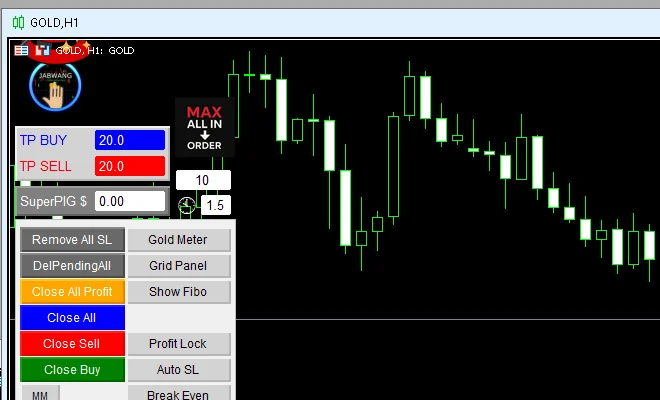
Screen-control buttons of Sword v4.67 · Gold Meter opens the Jabwang-Mini signal panel · Grid Panel opens the grid window · Hide folds the panel away
Illustrations
Chapter video
Real MT5 screen recording · not investment advice · trading involves real risk
TL;DR
Sword has four screen-layout buttons · Gold Meter opens the gold signal panel built on the Jabwang-Mini core · Grid Panel opens the grid settings window · Show Fibo turns on the level lines on the chart and is a post-auth button · Hide folds the main panel down to a small button to keep the chart clean · also note, the account info box ships turned off by default
When to use this feature
Use Gold Meter when you want a quick summary of gold signals · use Grid Panel when you want to set up a grid without going through the Pending buttons · use Hide when you want a full-screen chart
How to use
All the buttons sit in the right column of the panel — a button lit green means it is on, press it again to turn it off · Gold Meter opens the signal panel at the top of the chart, showing direction, stop points, and profit targets inside · Grid Panel opens the grid window that lays pending orders across several levels; setup details are in chapter 9 · Show Fibo turns on the level lines over the chart
The Hide button sits at the panel edge — press it and the main panel folds down to a small button; press again and everything comes back as before · one last small note: the account info box you may have seen on some machines is turned off by default; to show it you must change it on the Inputs page
Pro Tip · Mr. Bom
Take a screenshot once your layout is done · when you move to another machine or reset the profile, a reference photo lets you rebuild it fast · and when reading Gold Meter signals, always remember it is a decision helper, not a command from heaven — trading involves real risk
FAQ
Q: Which indicator is Gold Meter based on?
A: It is a signal panel built on the Jabwang-Mini core, which ships embedded with the EA
Q: Why does nothing happen when I press Show Fibo?
A: This button belongs to the post-auth set — before you pass auth you will not even see it
Q: Does Hide make the panel disappear completely?
A: No — it folds down to a small button you can press to bring it back
Q: How do I get the account info box to show?
A: Turn it on from the Inputs page; the default in this version is off
Q: Do these buttons open trades?
A: No — this group purely toggles the display
See also
Follow Mr. Bom on LINE
Ask further questions on LINE @icafefx · new version updates · signals and manuals, all free
Download Redhat Sword free
Semi-Auto Trading Panel · MT5 · XAUUSD · always try on Demo before any live account · trading involves real risk