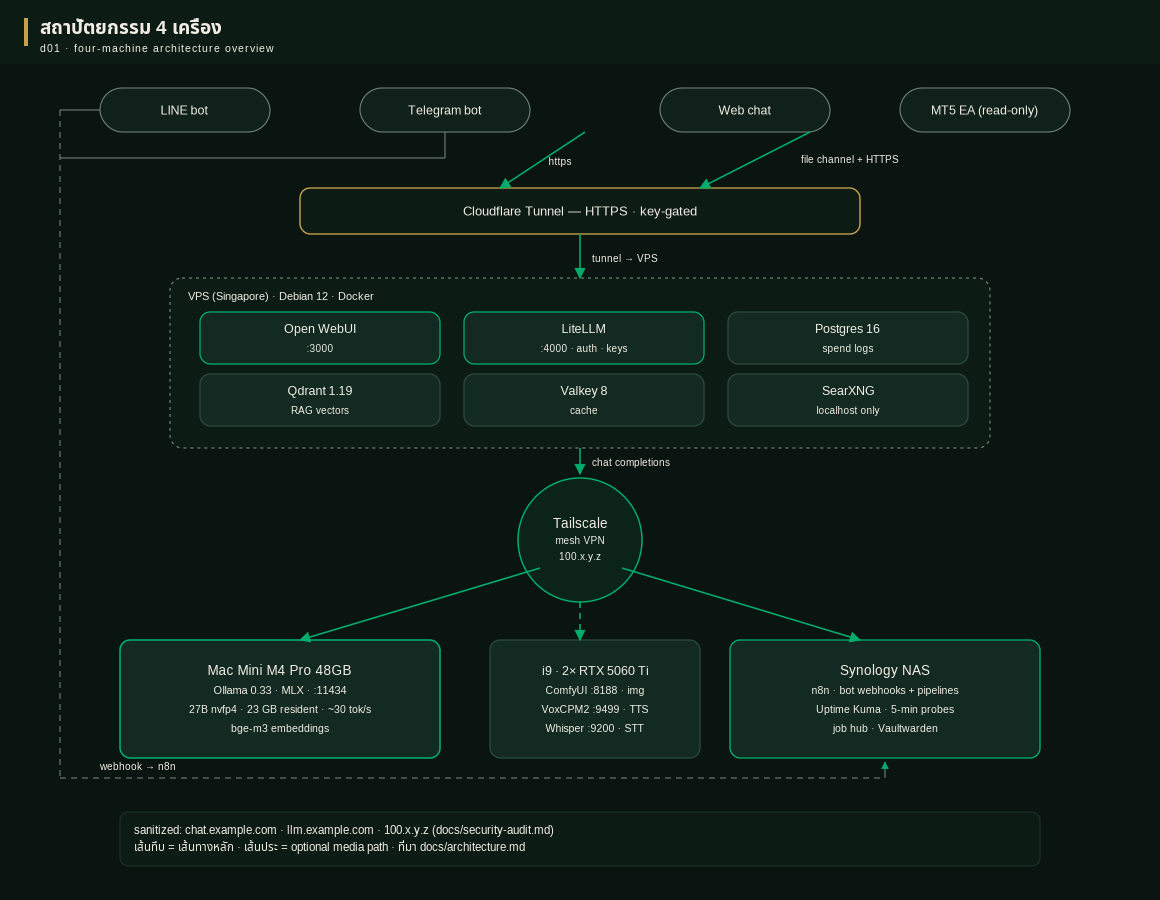
Goal of this chapter: turn the Mac into the "brain" — install Ollama with the fastest backend on Apple Silicon, MLX, then load the 27B model so it is ready to answer at 30 tok/s around the clock
What you have when the chapter ends: a 23GB resident main model + warm bge-m3 embeddings, plus 5 aliases (chat / think / code / deep / fast) that you can switch between for free
The VPS is the "front of house" — the point the outside world sees. It has 3 jobs: take HTTPS, check keys and budgets, and host the database/web search — all of it runs as Docker containers, six of them, raised by a single command
Do this chapter once the Mac is bought/prepared and chapter 4 (networking) is done — the Mac should stay on power with sleep off (or wake-on-network on), because it is the 24-hour central brain
The version we actually run and hold to: Ollama 0.34.2 (MLX backend) — never an unpinned latest — cross-check the release page against the date this manual was verified (chapter 16)
The model we actually run: the TURBO-Fable family of 27B Qwen fine-tunes (by DavidAU) in nvfp4 — pulled straight from the creator's Hugging Face
Do this chapter once the network (chapter 4) is ready — a minimal VPS of 4 vCPU / 8GB / Debian 12 or Ubuntu is enough (ours is 12 vCPU / 47GB because it is shared with other work)
You need Docker + the compose plugin (install per docs.docker.com for Linux)
You need Tailscale already on the VPS (note the Mac's Tailscale IP from chapter 4 to put into .env in the next chapter)
You need a domain with DNS already registered on Cloudflare (for the tunnel from chapter 4)
How-to
Step 1 — install Ollama as a service
# Install via Homebrew (macOS)
brew install ollama

# Run it as an always-on service
brew services start ollama

# Check the version — expect ~0.34.x
ollama --version
If you would rather keep the models on an external SSD: point OLLAMA_MODELS at that volume before the first pull
Step 2 — pull the model weights from Hugging Face
# Pull the 27B MLX nvfp4 weights from the creator's repo (~18GB) — illustrative example only, not runnable as-is: substitute a real repo/tag
ollama pull hf.co/<creator>/<model-set>:<nvfp4 tag>

# Build the main manifest from the repo's example file (edit FROM to point at the tag you pulled)
ollama create qwen38-chat -f configs/ollama-modelfile.example

# Create aliases that share the same manifest (free switching, no reload)
ollama cp qwen38-chat qwen38-think
ollama cp qwen38-chat qwen38-code
ollama cp qwen38-chat qwen38-deep
ollama cp qwen38-chat qwen38-fast
The model weights are not shipped in the repo — always pull them from the creator's HF (a licensing matter)
Step 3 — verify the brain is ready
ollama ps
# NAME                  SIZE      PROCESSOR   UNTIL
# qwen38-chat:latest    23 GB     100% GPU    23 hours from now
# bge-m3:latest         1.1 GB    100% GPU    3 hours from now

curl http://100.x.y.z:11434/api/tags   # from another machine in the mesh you must see the model list
If SIZE does not read ~23GB or PROCESSOR is not 100% GPU, go back and check the MLX backend first
The good part of this kit is the bootstrap.sh script — it checks everything first, then raises the whole stack with one command, safe to re-run:
# Clone the repo and prepare the secrets file
git clone https://github.com/siamcafe/bomllm.git
cd bomllm
cp configs/.env.example .env      # then open it and replace every CHANGE_ME value (chapter 7)

# Raise the whole stack (idempotent — safe to re-run)
./scripts/bootstrap.sh

# Or preview what it will do, without touching anything real
./scripts/bootstrap.sh --dry-run
The script will: verify .env is chmod 600, refuse any leftover CHANGE_ME values, generate litellm.yaml from the example, seed SearXNG, pull version-pinned images, run up -d, wait for LiteLLM to be alive, then run the smoke gate
What you must do yourself after bootstrap (the script prints it at the end):
Point the Cloudflare Tunnel: chat your-domain → localhost:3000 and llm your-domain → localhost:4000 (never open public ports directly)
Create the models on the Mac per chapter 5 (if not done yet)
Issue the per-channel keys — chapter 8
Run the full 6-check suite — chapter 16
Real output from the machine after a successful raise:
vps — example from the docs (sanitized) · docker compose ps
NAME SERVICE STATUS PORTSbomllm-litellm-1 litellm Up 26 days 127.0.0.1:4000->4000/tcpbomllm-open-webui-1 open-webui Up 26 days 127.0.0.1:3000->3000/tcpbomllm-postgres-1 postgres Up 26 days 5432/tcpbomllm-qdrant-1 qdrant Up 26 days 6333/tcpbomllm-valkey-1 valkey Up 26 days 6379/tcpbomllm-searxng-1 searxng Up 26 days 127.0.0.1:8888->8080/tcp# note: public ports = none at all — every container binds 127.0.0.1
Source: the components page of this manual (generated from the sanitized repo docs)
The full configs/ollama-modelfile.example from the repo, with a line-by-line explanation:
# FROM = points at the weight tag you pulled (change it to yours)
FROM turbo-fable-nvfp4

# The context floor shared by every alias — never set it lower than this
# [Real lesson] Miss this line once and direct callers (bypassing the proxy) silently drop to 8192
PARAMETER num_ctx 32768

# Sampling stays minimal here — real values can be overridden per request on the LiteLLM route
PARAMETER temperature 0.7
PARAMETER top_p 0.8
PARAMETER top_k 20
PARAMETER repeat_penalty 1.05

# Minimal persona for direct callers (the full Config G formula lives in chapter 12 and is applied at the route, not here)
SYSTEM """You are a helpful assistant. Answer in the language of the user's
most recent message unless instructed otherwise. Never emit Chinese characters
unless the user asks about Chinese. Be concise; admit uncertainty."""
Key rule: one manifest per model — behavioral differences are configured on the LiteLLM route, not by splitting Modelfiles into separate files
The heart of the front of house is docker-compose.yml — its most important parts with explanations:
services:
  litellm:
    image: ghcr.io/berriai/litellm:main-stable   # main-stable is upstream's moving track (not an immutable digest pin) — avoid latest and check the release page on every pull
    environment:
      # every secret comes from .env — no real values in this file
      LITELLM_MASTER_KEY: ${LITELLM_MASTER_KEY:?set in .env}
      # the Mac via Tailscale only — never a public IP
      MAC_OLLAMA_BASE_URL: ${MAC_OLLAMA_BASE_URL:?e.g. http://100.x.y.z:11434}
    volumes:
      - ./configs/litellm.yaml:/app/config.yaml:ro   # the real config, mounted read-only
    ports:
      - "127.0.0.1:4000:4000"   # the front of house is gated by the tunnel, never publish

  open-webui:
    image: ghcr.io/open-webui/open-webui:v0.11.3
    environment:
      OPENAI_API_BASE_URLS: "http://litellm:4000/v1"  # goes through the proxy only
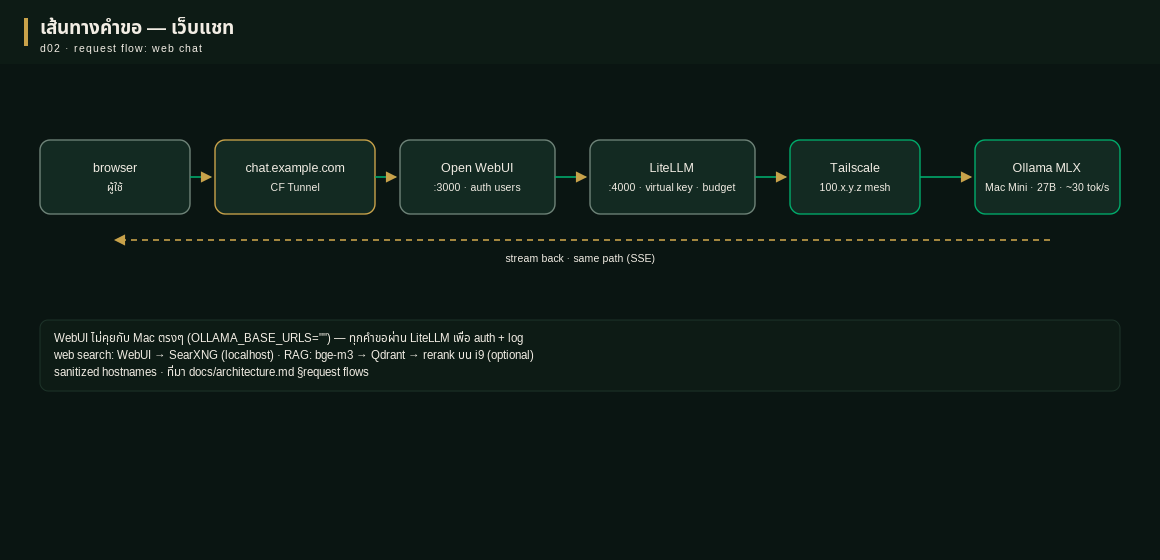
      OLLAMA_BASE_URLS: ""      # empty on purpose: the WebUI must not bypass the proxy straight to the Mac
      ENABLE_WEB_SEARCH: "true" # web search uses the local SearXNG (saves API fees)
      RAG_EMBEDDING_ENGINE: ollama

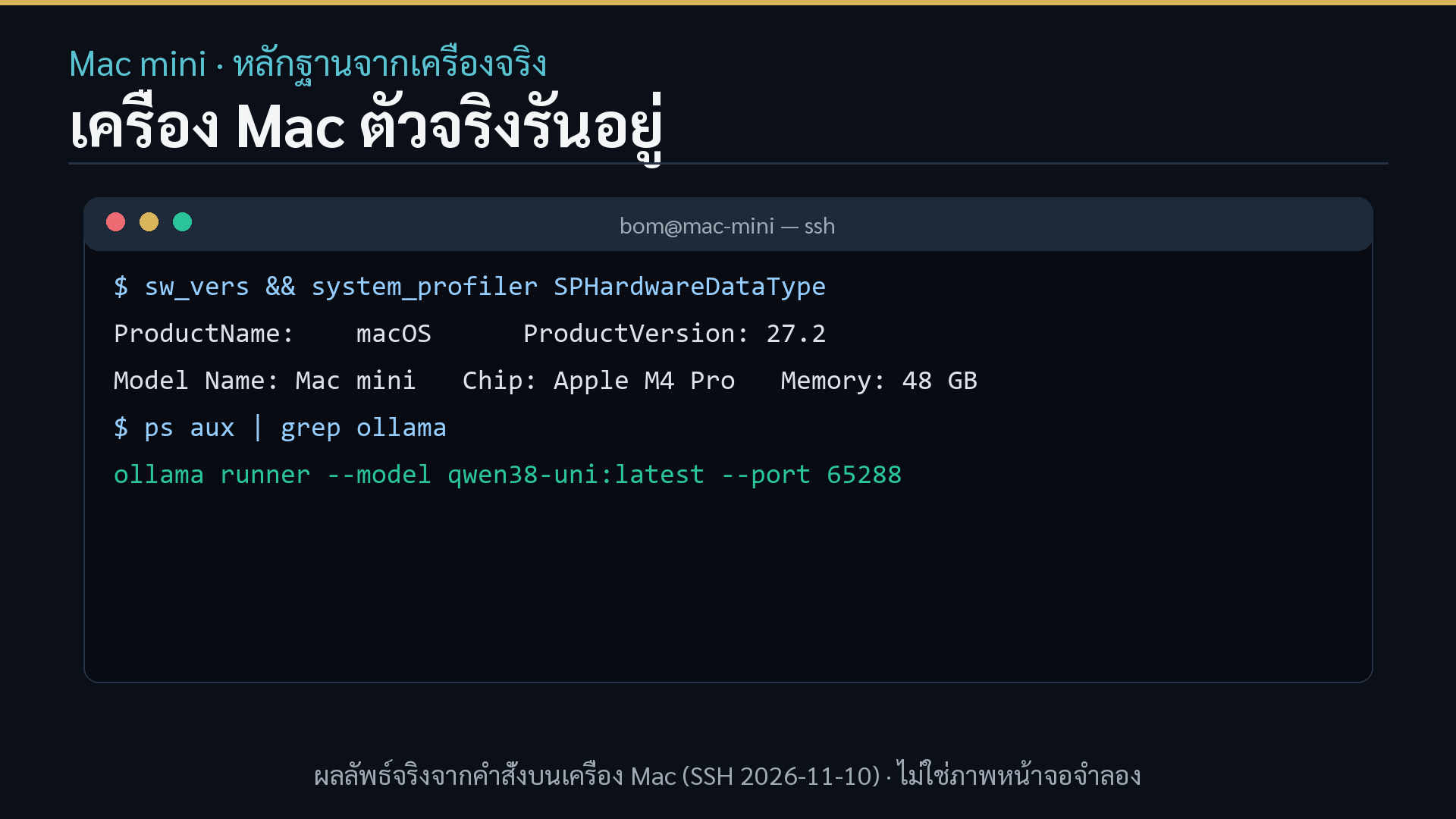
Real output of the command on the Mac over SSH (2026-11-10) — not a mock screenshot

      RAG_EMBEDDING_MODEL: bge-m3
The full version with every service lives in the repo — this file is designed to be copied and used as-is, with no secrets embedded
Pro tip — field-tested tricks
★ PROD LESSON
The MLX alias trap — the MLX backend does not share a runner between aliases with "different manifests" — every such switch costs a ~1.2-second reload (16 seconds the first time after a context change), while aliases sharing one manifest (made with ollama cp) switch free in ~0.8 s — this is why the manual insists that every alias is created with ollama cp
★ PRO TIP
Never let a health check wake an evicted model — we once watched a LiteLLM /health sweep reload a freshly evicted 16GB model on its own for ~24 hours until swap thrashed — the fix is to disable the background health check on quiet routes (set in litellm.yaml, chapter 7)
★ PROD LESSON
One auditable gate — make everything go through LiteLLM, even the web chat (keep OLLAMA_BASE_URLS empty) — because whatever does not pass the gate is what cannot be measured, cannot be budget-capped and leaves no log; this is design principle number one of the whole system
★ PRO TIP
Always pin versions — every image in the compose file uses a specific tag (postgres:16-alpine, qdrant:v1.19.1, searxng with a dated tag) — we once watched latest change behavior under our feet and lost sleep over it; since then, latest is a dirty word on the team
FAQ
Q: Why 27B and not something smaller? — Anything smaller clearly loses Thai quality in our tests, while anything bigger (32B+) eats RAM into swap risk — 27B on 48GB is the measured sweet spot
Q: What is TURBO-Fable, and is it safe? — It is a set of fine-tunes by an independent developer (DavidAU) on the original Qwen weights; we verified statistically that Thai does not regress (zero-failure CI) and that fewer Chinese characters leak than in the base model
Q: Can I run it on a VPS in Thailand? — Yes, but Singapore is recommended: closer to Thai users, low latency, similar price. The Mac at home talks to the VPS over Tailscale no matter where it sits
Q: Is the VPS a hidden cost not counted in the $0.54? — Yes. The ~$10–15/month VPS is counted separately because ours hosts other work too; if you rent a new one purely for BOMLLM, add ~$0.4 to the daily cost
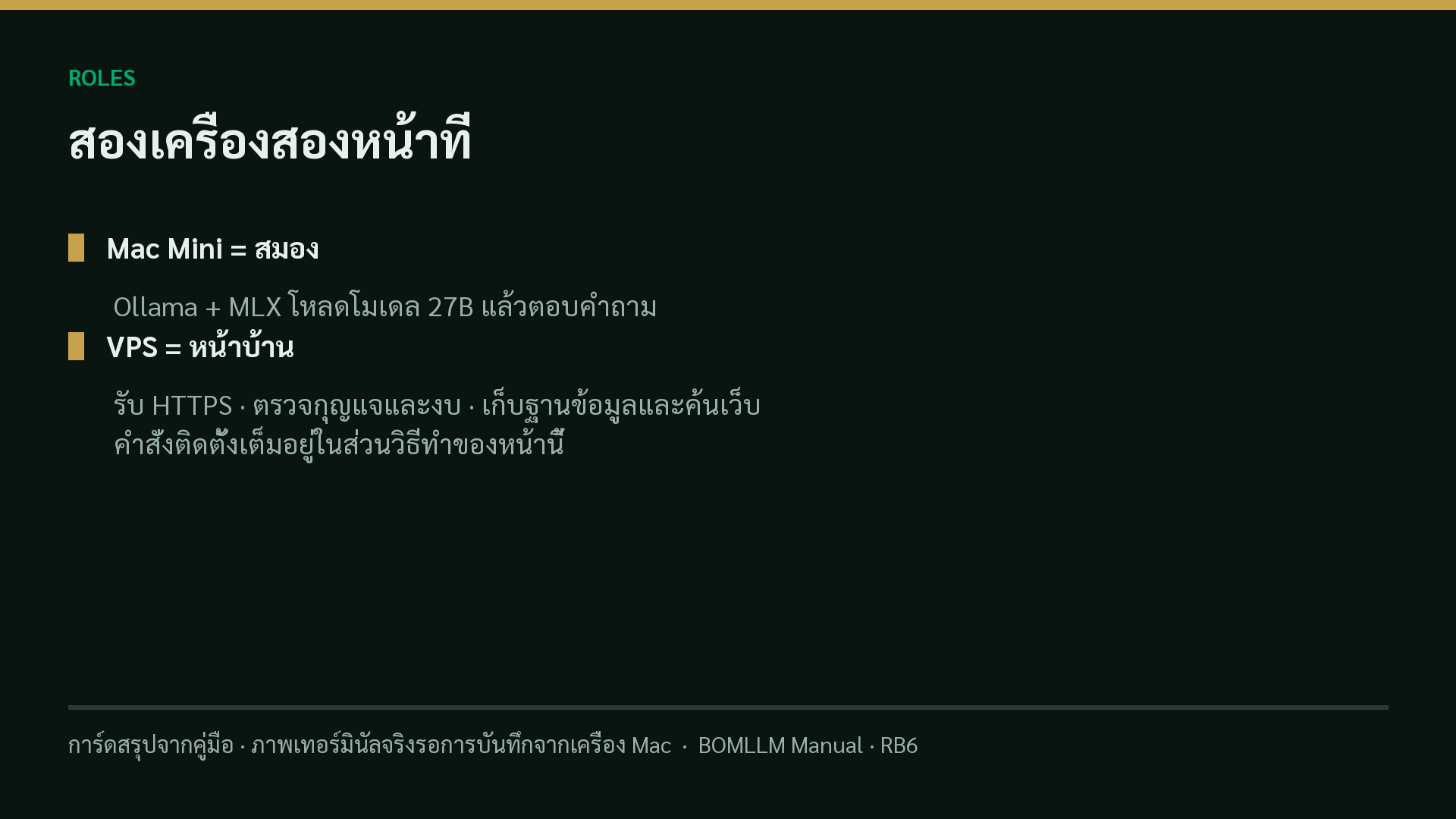
The VPS never calls the Mac directly outside the mesh6 containers in a single Docker network (bomllm)Summary card from the manual — a real terminal capture from the Mac is still pending
Real screen recording of this lesson · click play to hear the summary · not investment advice